Resolution Targeting (Digital Screens)
Guaranteed Campaigns
You can target screens in a digital line item according to their resolution (for example, 1080x1920). You can include or exclude specific screen resolutions from your targeting. You can create an unlimited number of targeting rules. Clicking the Select Resolution(s) drop-down menu reveals the list of available resolutions.

Screen resolutions are listed as follows:
- Landscape resolutions
- Portrait resolutions
- Square resolutions
- Unknown resolutions
When you select several screen resolutions from the list, the resolutions have an OR relationship.
Examples
Here's how you can use resolution to target specific screens:
- Include screens that have the following resolution:
- Resolution "1080x1920"
- Resolution "1080x960"
- Exclude screens that have the following resolution:
- Resolution "1080x960"
- Resolution "960x360"
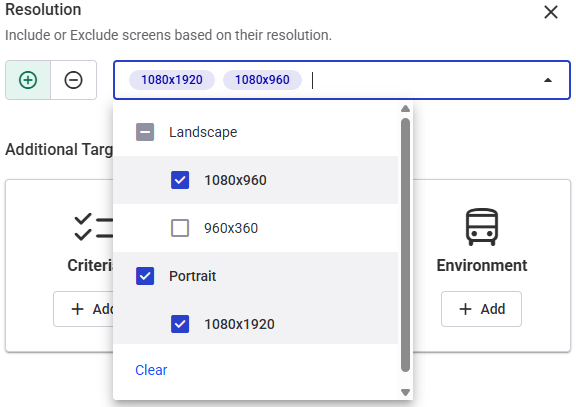
The system targets screens with the "1080x1920" OR "1080x960" resolutions.

The system will not target screens with the "1080x1920" OR "960x360" resolutions.
