 minute read
Packages in the Guaranteed Campaigns module are pre-defined bundles of screens designed to streamline the sales process and reflect your rate card offerings (Add and Edit Rate Cards). You can create them with fixed screen selections or dynamically populated based on saved filters. Each package includes defined ad flight durations, lengths, and pricing, making campaign creation faster and more efficient.
Note: Only users with the Admin or Direct Sales Admin role can add or edit packages.
By effectively utilizing packages, you can optimize your workflow, improve sales efficiency, and provide clients with readily available advertising solutions.
Here are the most common actions you can perform when working with packages.
| Task | Description |
|---|---|
| Create a Package | Define screen or face selections, flight durations, lengths, and pricing to create new digital or static packages that align with your sales strategy. |
| Edit an Existing Package | Modify existing packages to adjust pricing, screen or face selections, or other parameters as needed |
| Use Synchronized Screens | Configure a package to ensure that all screens play the same content at the same time. |
| Set Up Variable Pricing | Define different pricing tiers or rate cards for the same package based on time, day, or other conditions. |
| Select Packages | Choose which packages to include in your campaign. |
The Packages page displays all packages on your network.

Note: Only users with the Admin or Direct Sales Admin role can add or edit packages.
The package list provides a comprehensive overview of each package available on your network. It displays key details that you define during the package creation process in the Package Builder.
Note: Until a Direct Sales Manager, Direct Sales Admin, or Admin user publishes a package, it will remain hidden from Direct Sales users.

Packages List Column Headings
| Column | Description |
|---|---|
| Name |
The name given to the package during its creation. See Step 1 – Start the Package Creation Process. A blue icon indicates a digital package, while a green icon indicates a static package. |
| Inventory Type | Digital or Static. |
| Status |
The status of the package:
|
| Screens | Indicates the number of screens in the package. See Step 3B – Select Digital Screens. |
| Price | The price of the ad flight, based on rate card information associated with the screens in the package. See Step 7 – Enter a Price. |
| Flight duration | Indicates the ad flight length, in days, weeks or months. See Step 6 – Configure the Ad Flight and Saturation. |
| Ad duration | Indicates the length of the ad slot, in seconds. See Step 6 – Configure the Ad Flight and Saturation. |
| Creation Date | Indicates the date and time the package was created. |
| Last Updated | Indicates the date and time of the last explicit save of the package. |
Here are some features of the Packages page interface:
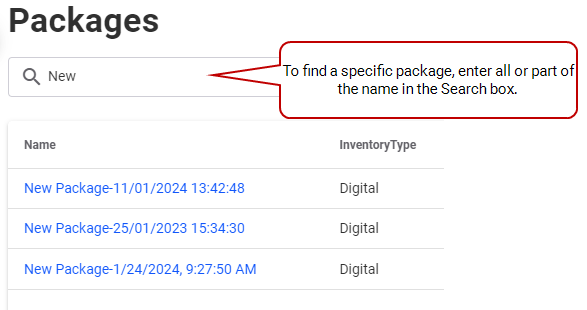
In the Search box, enter part (or all) of the name of a package you want to find.
To sort the items in a particular column, click its heading. To reverse the sort, click the heading a second time.


Click the Create Package button at the top right corner of the Packages page to get to the Package Builder.
If your inventory contains both digital screens and static faces, select the type of inventory you want to use for this package. Click either Digital Screens or Static Faces, then click Continue.
Click the campaign name or the  icon to edit its details. The Package Builder opens. See Create a Package.

Note: Users with the Direst Sales Manager, Direct Sales Admin, or Admin role can edit packages at any time, whatever the package status. See User Permissions.
Click the  icon of the line item to remove.

After exploring the Packages page, you could move on to:
- Create a Package (Direct Sales Managers, Direct Sales Admin, and Admin roles only)
- Select Packages
