

The Broadsign Air integrator guide covers setup and configuration as well as common use cases and best practices to get you started.
Broadsign Air is an add-on that allows users to leverage Broadsign’s technology on players that are not running the Broadsign software. This allows you to continue using your players while serving playlists from the Broadsign service to your endpoints.
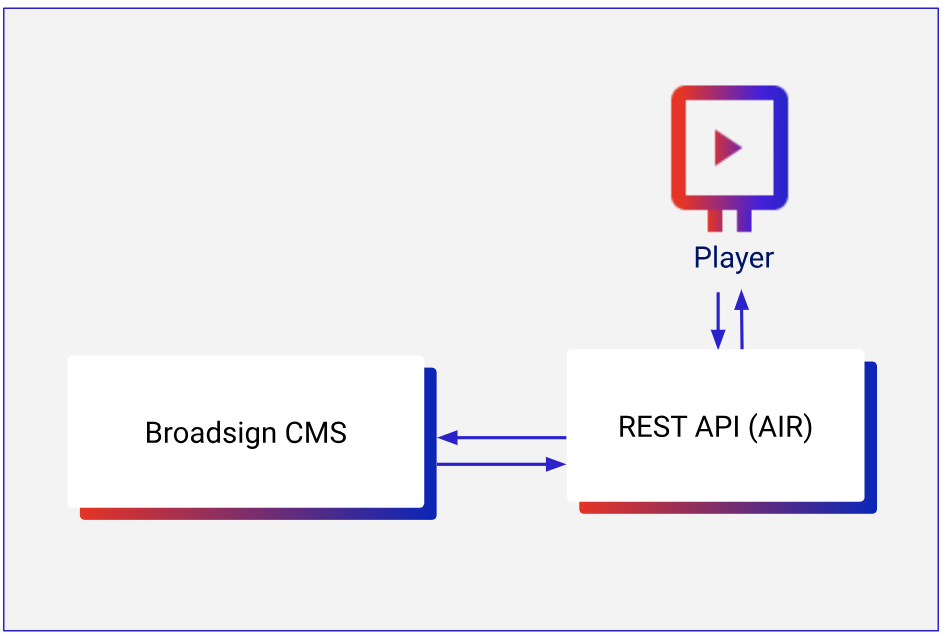
This document guides integrators and developers who need to connect third-party players to the Broadsign Control Administrator CMS using the Broadsign Air API.
Before using Broadsign Air, we must activate it on your domain. Contact your Broadsign representative to complete this.
Since the Broadsign Air playlists are based on timestamps, you must configure the Network Time Protocol (NTP) on your external players. This will avoid the players not playing slots at the exact time they should.
Once Broadsign Air has been activated, create an API user in Broadsign Control Administrator and generate an API token. If you have already created an API user, use the same token you previously generated (if applicable).
Tip: Broadsign Air uses the same authentication method as Broadsign's REST architecture and requires no configured privileges. Refer to Add a User in Broadsign Control Administrator for more information regarding this step.
You can use Broadsign Air in Online of Offline mode. You can flip between Online and Offline playlists.
Online Mode
Online mode is for generating playlists and serving them to players that have a stable and active network connection.
Basic
Every five minutes, call the generate endpoint, with a duration of 48 hours. Optionally, call the generate_long endpoint to receive playlists for upcoming days, as a backup.
- Pro – This is the simplest method that requires not stitching, unless the player is offline for more than 48 hours.
- Con – This can cause redundant bandwidth consumption by items that are returned repeatedly every call.
Bandwidth Optimized
Every 5 minutes, call generate with a duration of 10 minutes.
- Pro – This method requires minimal bandwidth while still supporting Broadsign's programmatic content correctly.
- Con – If brief network interruptions occur, this can cause playback issues, unless handled correctly.
Why this method works
Broadsign Air takes the results of any previous playlist calls into consideration so that content plays back to back, without gaps or mismatched timing. For example, if calling a 10 minute playlist, requesting the next playlist after 5 minutes will give you both the last five minutes and next 5 minutes of content.
Offline Mode
If using the bandwidth optimized approach, you should also use the generate_long endpoint to store a backup playlist for network outages. If the online playlist expires, you can fallback to the longer list. No scheduling changes will be received until the player is back online. For each day’s playlist, you must make a unique API call as the API generates a playlist for a specific date (for example, for Monday, you must perform an API call, for Tuesday, another call must be made).
Call generate_long for upcoming days, as a backup.
- Pro –This method can get up to 14 days of playlists in case of prolonged network outages, ensuring content playout even with no connectivity.
- Con – This method requires more calls and bandwidth and needs to have logic to flip between Online and Offline playlists.
Note: When you design your player application, note that only the generate endpoint returns programmatic content, and it only includes this content in the first 10 minutes of the returned playlist. This limitation exists because you must play programmatic content immediately after winning a bid and confirm playback within a 15-minute window. To maximize your chances of filling your loop with programmatic content, you should call the generate endpoint at least every 10 minutes.
This section describes how Broadsign Air plays content.
Download Content
Players must download content and cache it locally. Players should not simply include URLs of the content in an HTML presentation element, as this method will effectively re-download the content each playback cycle, leading to possible high bandwidth costs and poorer performance.
There are two different ways of getting a list of content to download and play: the 'playlist' calls (generate and generate_long) and the 'content' call.
- The 'playlist' calls contain only items that are included in the playlist, along with filler and optionally programmatic content.
- The 'content' call contains all items that could potentially play.
The primary tradeoff here is:
- Limiting bandwidth usage and knowing about content early enough to have time to download it before the time when it's needed.
- For players with a considerable list of programmatic content, redundantly collecting the list of all possible programmatic content every 5 minutes results in a significant amount of data.
Implementation
The following are typical implementation scenarios to help match your specific use cases.
- If the player is known to have a very small subset of content that does not frequently change, using generate to download the playlist is sufficient.
- Requesting longer (48 h) playlists with generate to download all content.
- Requesting shorter (10 mins) playlists with generate and
exclude_programmatic=trueand calling content infrequently (for instance, every hour or day, or depending on how often the content is expected to change). This is a good solution for players that want to limit bandwidth consumption during the day, while calling content every night.
Playback Timing
Each item has a precise start time. It is expected that players will play the content at precisely the indicated time. This has more specific implications when applied to synchronized playback (across frames or players) and Broadsign Reach.
Toggle Between Online and Offline Playlists
Note: The generate and generate_long playlists are not synchronized. You must implement your own logic to handle the switch between both.
Assuming you have a player with a generate playlist of one hour and also a generate_long playlist stored, if the player were to go offline for more than one hour, it would be expected to start playing items from the generate_long playlist.
It is highly unlikely that the next item to play in the generate would occur immediately after the last item available in the generate playlist. In those situations, a padding strategy is required. One such strategy that Broadsign/Broadsign Control for System on Chip uses is to keep the previous content on screen up to 500 ms longer, and if the gap is longer than 500 ms, to insert filler items as needed. If the gap is longer than 500 ms but shorter than the shortest filler available, a black screen is a final fallback.
Multiple Screen Synchronization
When multiple devices are being targeted, it is recommended to have a mechanism that ensures all devices go from the online to the offline playlist at the same time. This applies to single players, multiple screens and multiple players (DU Group).
Reporting Playback
- Playback tokens should be stored locally and not submitted immediately.
- The recommended procedure is to submit all newly accumulated tokens every 5 minutes. For instance, submit all tokens collected up until this time then 5 minutes later, submit all newly collected tokens.
- Submit a maximum of 1,000 tokens at a time. Submit one or more calls for any tokens above that limit. For instance, if submitting 2,500 tokens, schedule 2 calls with 1,000 tokens and 1 call with 500 tokens.
- Make sure to wait for an
HTTP 200 - OKresponse before considering the tokens submitted.
Monitoring
To see player statuses (online, offline, MIA) in Broadsign Control, include next_expected_poll in every generate request.
next_expected_poll is the time (UTC, ISO 8601) when the player will request its next playlist. Broadsign uses it as a deadline:
- Online: the player polls again before the deadline.
- MIA: the deadline passes without a new poll. A Player Incident is created.
- Offline: the request has no
next_expected_poll.
Values under 20 minutes are raised to 20 minutes despite whatever frequency was chosen for the playlist generation
Example: at 13:40 UTC, a player that polls every 5 minutes sends:
{
  "player_identifier": "broadsign-1",
  "duration": "600s",
  "next_expected_poll": "2026-10-29T13:45:00.000Z"
}
Broadsign sets the deadline to 14:00 UTC (the 20-minute minimum). If the next poll arrives before then, the player stays online. If not, it becomes MIA.
CORS
If your player is not browser based, it will not need to mitigate “Access-Control-Allow-Origin” issues. If you attempt to generate playlists from the browser, you will receive CORS error messages.
This section outlines Broadsign’s best practices to ensure your integration works efficiently.
Playlist Generation Strategy
For this integration, Broadsign provides two primary endpoints to retrieve the “Broadsign Air Playlist” for a device. To ensure both real-time schedule accuracy and uninterrupted offline resilience, we suggest integrators implement a dual-endpoint architecture.
The integration should treat generate_v2 as the active engine for daily playback, and use generate_long strictly as an offline failover mechanism.
Active Online Mode (generate_v2)
- The player must actively run on the generate_v2 endpoint during normal operations.
- Polling & Duration – The player should call the endpoint every 5 minutes, utilizing the duration parameter to generate a playlist for the next 10 minutes (600 seconds).
- Operational Goal – Operating in this tight polling cycle ensures that the player constantly receives the most up-to-date schedule, capturing any last-minute campaign bookings updates, or programmatic campaigns.
For more information, refer to the generate v2 endpoint documentation.
Offline Backup Mode (generate_long)
- To protect against network outages and connectivity issues, the player must maintain a local backup schedule.
- Polling Frequency – The player should quietly call the generate_long endpoint in the background once a day to retrieve an offline playlist valid for up to 14 days.
- Switch-Over Logic – The generate_long playlist should only be triggered as a fallback. If the player loses connectivity and is unable to successfully fetch its next generate_v2 playlist, it must seamlessly switch over to the generate_long offline schedule once its current 60-minute active buffer is exhausted. The player will continue to operate in this offline mode until network connectivity is restored and a new generate_v2 call succeeds.
For more information, refer to the generate_long endpoint documentation.
Content Management Strategy
Based on the official Broadsign Air documentation, Broadsign recommends the following methods for integrators to manage content downloading, caching, and retention.
Local Download and Caching (Local Caching)
Broadsign requires that content be downloaded and cached locally. Players should not broadcast the content URLs coming into the contents array as streaming content.
Treating URLs directly as streaming forces the device to re-download the file each time it plays in the loop. This consumes unnecessary bandwidth, causes black screens, and leads to high data consumption. This creates network bottlenecks that, depending on the network, can affect other business areas.
Origins and Variability of Download URLs
The API's contents array includes the URLs from which the player must download the assets. These URLs will change depending on whether the content comes directly from the CMS or from the programmatic flow (SSP):
| Broadsign CMS | Programmatic Flows (SSP) |
|---|---|
|
download.control-prod.broadsign.com |
*.serv.broadsign.com d11rw001w2vjda.cloudfront.net delivery.reach.broadsign.com |
Note: It is essential that the player's network infrastructure allows traffic to all these domains to ensure campaigns download correctly.
Lifecycle and Disk Cleanup (Disk Space Management)
Keeping downloaded content is the integrator's decision and will mainly depend on the available disk space on the player. However we suggest two main strategies to manage the cleanup process.
Strategy A: Immediate Cleanup
Broadsign recommends to store the content locally until it is no longer part of the API's contents array.
How it works – When an advertising campaign ends and a new playlist is requested, the content will no longer appear in the items or contents arrays. At that moment, the player can safely delete it from the local storage.
Strategy B: Extended Retention
Some clients use a different strategy, keeping the content on the hard drive for longer periods (for example, 6 months).
How it works – If a campaign ends but the client decides to reactivate it 15 days later using the same asset, keeping the file on the disk avoids having to download it again.
Advantage – This practice significantly reduces bandwidth consumption, which is essential to limit data use on networks and avoid bottlenecks. After the configured retention time passes, the player checks if the asset is still in the contents array and, if not, deletes it permanently.
HTML5 Content Management (ZIP Packages)
HTML content appears in Broadsign Air with a URL where a compressed ZIP file can be downloaded.
To play this content correctly, follow these best practices:
- Extract into a unique folder – We highly recommend extracting the ZIP file into its own folder named after the value coming in the array of contents (
adCopyId). This is essential to prevent files from mixing or overwriting files from other campaigns. - Find the main file – In the API's contents array, inside
htmlPackageParameters, you will find themainHtmlFilePathfield. - Load the content – This field tells the integrator exactly which main file (usually an .html file) the player needs to load in order to display the content.
Confirm Playback Strategy
The confirm_playback endpoint is mandatory, functioning as the official Proof-of-Play (POP) mechanism in Broadsign Air. It validates ad delivery and confirms playback metrics. For more information, refer to the confirm_playback endpoint documentation.
To ensure optimal performance and avoid unnecessary network overhead, third-party CMS players must follow these operational best practices:
- Local Token Buffering – Buffer playback tokens locally on the device upon item completion rather than transmit them immediately one-by-one. Submitting a network call after every creative is played causes excessive bandwidth usage and connection overhead.
- Batch Frequency & Schedule – Aggregate and dispatch stored tokens in batches every 2 minutes (see Reporting Playback).
- Batch Size Limits – Each request accepts a maximum of 1,000 tokens. If a player has accumulated more than 1,000 tokens (for instance, following an extended network outage), the playback engine must paginate them into consecutive batch requests.
- Persistent Storage & 200 OK Verification – Tokens must remain safely in local persistent storage until the Broadsign server returns an
HTTP 200 OKresponse. If a call fails due to network loss, retain the tokens in cache and retry during the next 2-minute cycle. - Initial Registration Handshake – The very first call made to this endpoint acts as a device registration step and returns an empty
HTTP 200response. - Screen Identification & Multi-Screen Topologies – Reporting Proof-of-Play (POP) depends on your hardware setup and how players are registered in Broadsign Control:
- Single-Screen Setups – When one player drives one screen, each confirmation equals one POP. Use
screen_identifier = 1. - Multi-Screen Setups – When multiple physical screens are linked to a single Broadsign Control player registration, each screen must send its own playback confirmation using a unique
screen_identifier(1, 2, 3...).
- Single-Screen Setups – When one player drives one screen, each confirmation equals one POP. Use
Broadsign Air aggregates these individual confirmations on the server side. Once a required number of screens check in, it automatically issues a single, multiplied POP for the venue.
If some screens in a multi-screen setup lose connection or are interrupted, Broadsign Air can still generate valid POPs. Administrators can configure server-side rules such as POP Thresholds (allowing a specific number of screens to miss confirmation) or Timebox Tolerances (accepting incoming confirmations within a specific time window).
For complete instructions on configuring server-side aggregation, thresholds, and timeboxes, refer to Reporting Players POPs with Broadsign Air.
This section covers the most commonly asked questions and Broadsign’s answers to them.
Q : Some items in the returned playlist "items" array have a "contentIndex" value which points to an item in the "contents" array, most do not; only "duration" and "token" values are available
The contents array uses standard 0-based indexing (ranging from 0 to X). If an element in the items array does not explicitly include a contentIndex key, it implicitly defaults to index 0.
Check the attached playlist file. In this specific payload, the very first item lacks a contentIndex property, meaning it will play the content mapped to index 0, which corresponds to orange.jpg with "adCopyId": "1892376521" from the array of contents.
Q : What is the expected playback when no contentIndex value is given for a playlist item?
No contentIndex inside an item means contentIndex = 0 from the array of contents. See the previous answer.
Q: It is recommended to request a playlist duration of 48h (172800 seconds). Is the expected behaviour similar with much shorter playlist lengths, such as 600 seconds or 3600 seconds?
The API does support shorter playlist durations; however, Broadsign does not recommend using them. The reason is that if the player delays or fails to request a new playlist on time (due to issues such as network loss or latency), it may end up without content, no available tokens, and therefore no advertising playback.
This is why we recommend the default longer duration.
We suggest calling the API regularly (every 5 minutes) to retrieve an updated playlist. The minimum call interval is 1 minute. This playlist may or may not change between requests.
To illustrate the use case: imagine you request a playlist at 14:00 and receive a valid schedule. At 14:45, your company launches a new campaign starting at 15:00. In this scenario, regular polling ensures you can retrieve the updated playlist in time so the new campaign is included in the schedule.
Q : How often can the /playlist/v2/generate endpoint be requested? There seems a strict limit that leads to a 429 "Too many requests" response
If you make two requests within less than one minute for the same player, you will receive a 429 “Too Many Requests” response. This is important at the player level: if you have 50 players, you can make 50 requests at the same time as long as each request targets a unique player.
The recommended approach is to make one request approximately every 5 minutes to retrieve the playlist, which may remain the same or include changes depending on what is scheduled in our platform.
Q : What is the retention period of downloaded content?
It is up to you, although the recommendation is to store the content locally until it is no longer part of the content array.
For example, imagine you download “strawberries.jpg” and it is included in the contents array. When the advertising campaign ends and you request a new playlist, this content will no longer appear in either items or contents, and therefore you can safely remove it from local storage.
Some clients apply a different strategy, such as keeping the content for 6 months and then checking whether it still belongs to the contents array. If it is still present, they keep it; if it is not, they delete it.
The reason for a 6-month retention policy is that there may be cases where a campaign runs for 1 month, ends, and you do not delete the content because of the retention rule. Then, for any reason, the client reactivates the same campaign 15 days later using the same content. In that case, if you had already deleted it, you would need to download it again (as explained above). With a 6-month retention policy, you avoid re-downloading the content and therefore reduce bandwidth consumption. However, this is your decision and it depends mainly on the player’s available disk space.
Q : What is the relevance of the dataSynchronizations array in our context?
dataSynchronization allows you to recreate monitor-sync functionality (The Monitor Sync Section) where dynamic content may download supporting data feeds. It is the player's responsibility to download these files to the specified location so the content can find them when it plays. A good example of this is when querying for new data from sources that update frequently, such as news or weather.
Q : Is the generate_long endpoint the only possibility for requesting future events? Even this can only generate playlists for certain dates, not times. Can a playlist be generated for "today at 02:00 pm", for example?
The generate_long endpoint is not intended to schedule playlists for a specific time of day, such as “today at 02:00 pm”. Instead, it is designed to retrieve offline playlists for a full day (up to 14 days ahead), primarily for scenarios where a player may be disconnected for an extended period.
Q: Is the necessary data for player_identifier and screen_identifier available to our customers who use this in their product later on? If so, how and where?
The player_identifier is a value obtained from the Broadsign CMS. If you synchronize your inventory with us, we will always provide you with the corresponding player_identifier as part of the response. You don't need to provide this data to them (clients), they don't need to know it.
In case you want to extend this integration to other clients, we will define which player_identifier should be used. This is something we can agree together depending on the project or specific customer setup.
The screen identifier is slightly different. Imagine you have a single player connected to an HDMI splitter that outputs the signal to 4 screens.
At the Broadsign CMS level, we configure the Broadsign Air Player with a screen count of 4.
When generating the playlist, it does not matter whether you make the request using screen_identifier 1, 2, 3, or 4, because the playlist itself is identical. In reality, there is only one player, even though the hardware distributes the signal to 4 physical screens.
However, from the advertising system perspective, the platform considers that there are 4 screens. Therefore, it will multiply the proof of play (POP) by 4, as long as you send the playback confirmation 4 times using the same token but a different screen_identifier in each request.
This is a more complex use case. For now, regarding the integration between both systems, you should work with screen_identifier = 1 or leave this blank.
If you have setups where multiple screens are connected via an HDMI splitter, we can review and refine this behavior.
Q: Requests to the playlist generation endpoints return an empty 200 OK response. Is this expected?
If the player is not attached to a specific display unit, this is expected. Once the player is attached to a specific display unit, the playlist should be generated, as long as there is something scheduled for that device.
Q: Why does only the first item in the playlist have a start_time?
The start_time indicates when the playlist begins. Every time you request a playlist from the API, the first item will include this start_time.
You may also encounter additional start_time values within the same playlist if the inventory has been configured with opening hours.
For example, imagine a display is configured to operate from 05:00 AM to 11:00 PM, Monday through Sunday. If you request a 48-hour playlist at 09:00 AM, the playlist will likely contain another start_time for Day +1 at 05:00 AM, and another one for Day +2 at 05:00 AM. These entries indicate when playback should resume each day after the display's scheduled overnight downtime.
In other words, additional start_time entries only appear when there are schedule boundaries, such as opening and closing hours, that require the playlist to resume playback at a specific time.
To validate API calls to the Broadsign CMS, verify the returned JSON to ensure that there are no errors and that the API is returning a link to the package resource.
Playlist Payload
{
    "items": [
        {
            "startTime": "2026-05-19T08:32:19.054Z",
            "duration": "10s",
            "token": "Cg50ZWxlZm9uaWNhLTAwMRINRXVyb3BlL01hZHJpZBjulPX64zMgkE4oATjJv62GB0CRsIOpB0jFqoOpB3Cso62GB4oBAggDkAGEsIOpB5gBw6qDqQegAaSb440F"
        },
        {
            "duration": "10s",
            "token": "Cg50ZWxlZm9uaWNhLTAwMRINRXVyb3BlL01hZHJpZBj+4vX64zMgkE4oATjLv62GB0CRsIOpB0jFqoOpB3Cso62GB4oBAggDkAGEsIOpB5gBw6qDqQegAaSb440F",
            "contentIndex": 1
        },
        {
            "duration": "30s",
            "token": "Cg50ZWxlZm9uaWNhLTAwMRINRXVyb3BlL01hZHJpZBiOsfb64zMgsOoBKAE46b3XnQdA87uDqQdIxaqDqQdwrKOthgeKAQIIA5AB8buDqQeYAcOqg6kHoAGkm+ONBQ==",
            "contentIndex": 2,
            "campaignIndex": 1
        },
        {
            "duration": "30s",
            "token": "Cg50ZWxlZm9uaWNhLTAwMRINRXVyb3BlL01hZHJpZBi+m/j64zMgsOoBKAE46b3XnQdA87uDqQdIxaqDqQdwrKOthgeKAQIIA5AB8buDqQeYAcOqg6kHoAGkm+ONBQ==",
            "contentIndex": 2,
            "campaignIndex": 1
        }...
    ],
    "contents": [
        {
            "name": "orange.jpg",
            "mimeType": "jpg",
            "uri": "https://download.control-prod.broadsign.com/content/1892372908/1892376521.jpg",
            "size": "205692",
            "hash": {
                "type": "CRC32",
                "payload": "OTY0MTgyMjQ="
            },
            "adCopyId": "1892376521"
        },
        {
            "name": "strawberries.jpg",
            "mimeType": "jpg",
            "uri": "https://download.control-prod.broadsign.com/content/1892372908/1892376523.jpg",
            "size": "186690",
            "hash": {
                "type": "CRC32",
                "payload": "OGYzZDE0YTk="
            },
            "adCopyId": "1892376523"
        }...
    ],
    "identification": {
        "playerId": "1892372908",
        "displayUnitId": "1965086019",
        "displayUnitLatlong": {
            "latitude": 30.8406,
            "longitude": -115.284
        },
        "displayUnitAddress": "BCN"
    },
    "campaigns": [
        {
            "campaignId": "1965086724"
        },
        {
            "campaignId": "1965088241"
        },
        {
            "campaignId": "1892409072"
        }...
    ],
    "frames": [
        {
            "frameId": "1965086021",
            "name": "Fullscreen"
        }
    ],
    "geometries": [
        {
            "width": 1920,
            "height": 1080,
            "fullscreen": true
        }
    ]
}