 minute read
Attributes Targeting
Guaranteed Campaigns
Attributes are keywords or tags that allow you to target specific Faces for content delivery. By assigning attributes to Faces, you can ensure that your content is displayed only on the most relevant Faces within your network. You can assign multiple criteria to each Face for efficient, error-free scheduling
Note: When using the Static Operations module to manage static campaign operations, the Attributes used to filter Faces when creating or editing Campaigns are derived from the Inventory Attributes assigned to those Faces. Proper setup of these Inventory Attributes is essential for the Campaigns to function as intended. Incorrectly configured Inventory Attributes can lead to Campaigns targeting the wrong Faces or failing to target the right Faces. For more information, see Inventory Attributes.
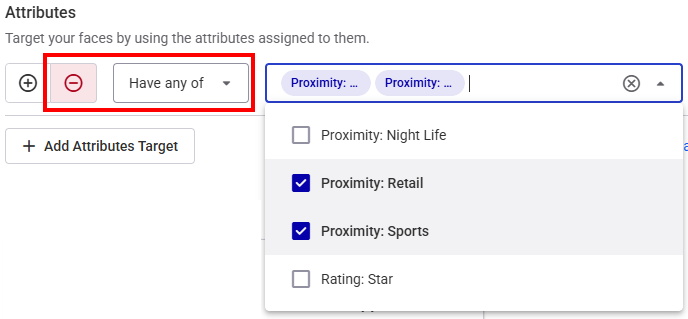
Once Faces have their attributes assigned, you can target them by clicking the Add Attributes Target button to create a targeting rule. There is no limit on the number of targeting rules that you can create.

Category Exclusions
If you have selected category exclusions in Step 3 – Select Category Exclusions (Optional) of creating the campaign, these exclusions are listed as read-only targeting rules. They cannot be changed or removed.

Examples
Here's how you can use attributes to target specific Faces:
- Include Faces with Have all of the following attributes:
- Proximity: Retail
- Proximity: Sports
- Include Faces with Have any of the following attributes:
- Proximity: Night Life
- Rating: Star
- Exclude Faces with Have all of the following attributes:
- Proximity: Night Life
- Proximity: Retail
- Exclude Faces with Have any of the following attributes:
- Proximity: Retail
- Proximity: Sports
This will target Faces located near retail and sports locations.

This will target Faces located near either Night Life or Star locations.

This will exclude Faces that have been categorized as being near night life and retail locations.

This will exclude any Faces that have been categorized as being near retail or sports locations.
Combining Include and Exclude Attributes
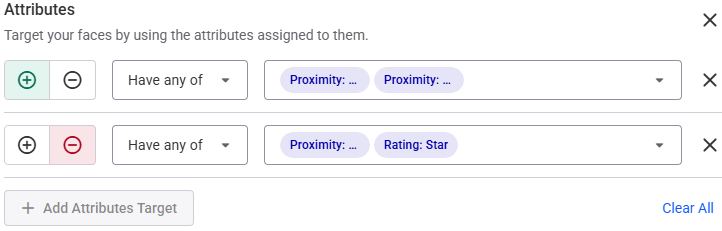
For more complex targeting, you can combine include and exclude attributes. For example, you could include Faces that have all the "Proximity: Retail" and "Proximity: Sports" attributes, and exclude Faces that have any of the "Proximity: Night Life" or "Rating: Star" attributes. This would ensure your content is only displayed on Faces located near retail and sports locations, excluding any Faces located near night life or star rating locations.
By effectively utilizing attributes, you can precisely target your content, ensuring it reaches the right audience at the right time and place.
