 minute read
This page describes how to compute pricing information by using a third-party integration.
External Pricing API
Guaranteed Campaigns
The external pricing API feature allows you to bypass the internal Guaranteed Campaigns rate cards and manage pricing externally through your own pricing engine. This way, the Guaranteed Campaigns module ingests pricing data from your external pricing engine, offering flexibility and control over the pricing strategy.
- The CPM override feature is a prerequisite for the External Pricing API. It is enabled automatically and cannot be disabled when a domain has the External Pricing API enabled and gets a price from an external pricing engine.
- The External Pricing API provides a CPM override to the line item.
- The CPM override reflects the externally managed pricing and appears in the CPM Override field on the Create Digital Line Item page.
Note: The CPM will only be updated if you modify anything on the line item, which ensures that pricing remains stable unless you make any edits.
You can set the URL and API key of your External Pricing API endpoint in the Domain settings. See Pricing API.
Note: Guaranteed Campaigns settings are available only to users assigned the Admin or Direct Sales Admin role.
To configure the External Pricing API endpoint:
Guaranteed Campaigns
- Access the Settings page.
- In the Guaranteed tab, click General.

- In the Pricing API part, enter the URL for the external pricing endpoint and your API Authentication key.
To use the External Pricing API in the Guaranteed Campaigns module and perform final calculations for different types of buy, follow these steps:
To use the External Pricing API:
Guaranteed Campaigns
- Create a Guaranteed Campaign.
- Choose the screens and configure settings such as type of buy, ad length, and duration as usual.
The Guaranteed Campaigns module communicates with the External Pricing API, which fetches and updates the pricing information dynamically based on your screen selection.
The Guaranteed Campaigns module performs the final calculation using the pricing information received from the External Pricing API.
The calculated values are then used to complete the setup of the line item, ensuring accurate and dynamic pricing for the specified type of buy.
You can override the price that the External Pricing API provides by overriding the value in the Price Adjustments section.
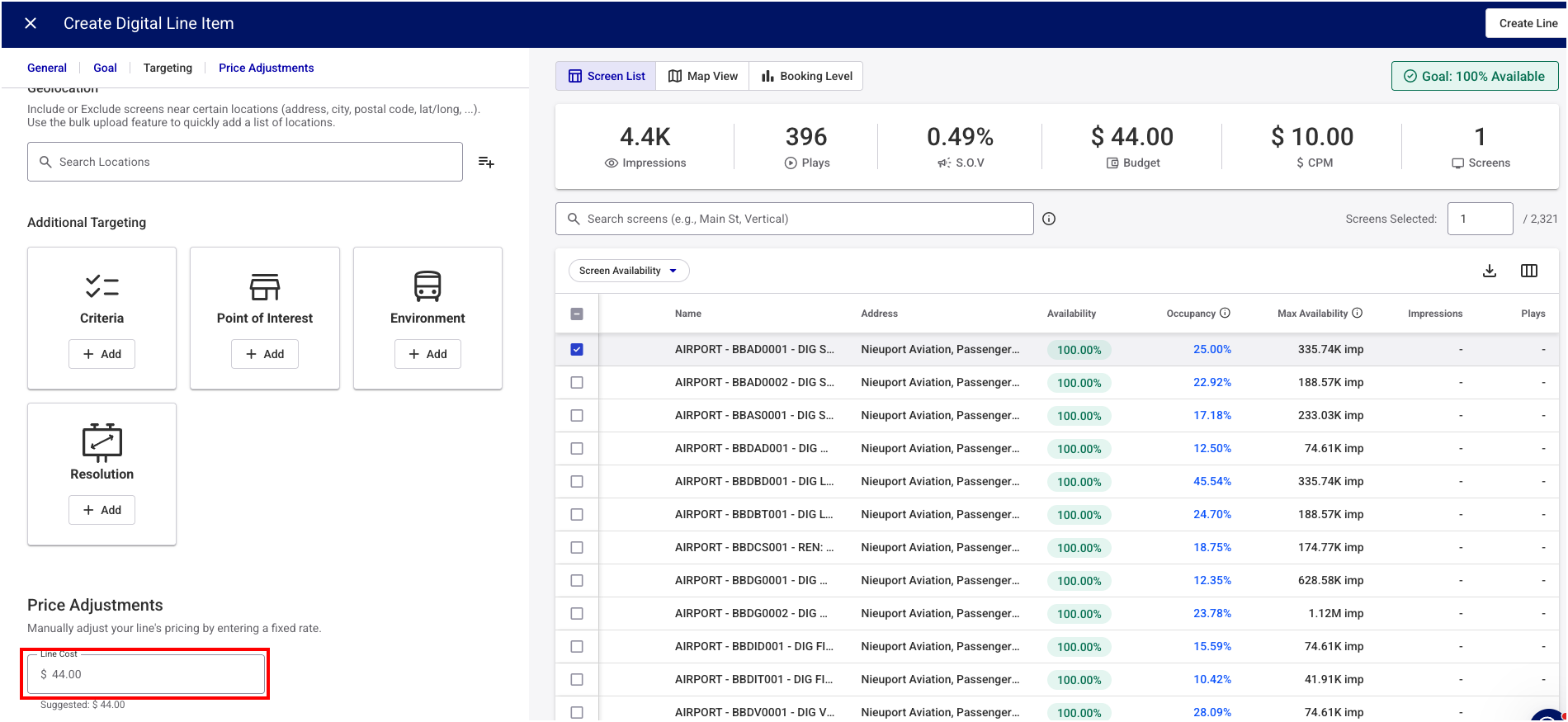
Note: If the External Pricing API does not return a value, the Add Pricing Adjustment button is activated so that you can enter the desired price or CPM manually. See Step 8 – Adjust the Price (Optional).
You can also override the cost of the line item in the Campaign Builder. The system will consider the override value for final price calculation.

The following describes how the External Pricing API works.
The Guaranteed Campaigns module sends all the selection details to the external pricing engine with the following API call:
POST https://direct.broadsign.com/api/v1/third_party/pricingThe following is a sample payload:
{
"schedule":
{
"start_date":"2023-12-19",
"end_date":"2024-01-01",
"start_time":"00:00:00",
"end_time":"23:59:59",
"dow_mask":127,
"slot_duration":15
},
"screens":[224016,224020],
"filters":[],
"buy_mode":
{
"type":"ppl",
"values":{"bs_saturation":1,"saturation":1,"custom_cpm":0},
"active":true
}
}The following is a sample response for the following types of buy:
- Frequency
- Share of Voice
- Takeover
{
"override_type": "price",  #override type is price for these type of buys, Direct will expect a price value
"value": 450.0             #final value of price returned
}
The following is a sample response for the following types of buy:
- Impression
- Budget
- Plays
{
"value": 10.0,            #final value of CPM returned
"override_type": "cpm"    #override type is CPM for these type of buys, Direct will expect a CPM value
}You can call the pricing engine to extract the recent values sent by the external pricing engine with the following API:
GET /api/v1/third_party/pricing/logs/proposal_item/<proposal_item_id>The following is a sample response to that call:
   "id":12345,
   "override_type": "cpm",
   "value":10.0,
   "arbitrary_additional_info":
{
      "screens":[
         {
            "id":"1",
            "Cpm":15.0 // CPM for screen 1
         },
         {
            "id":"2",
            "Cpm": 2.0  // CPM for screen 2
         }
      ]