 minute read
The Inventory page allows you to view the digital screens and static faces (sellable units) currently available in your inventory. You can find these listed under two separate tabs, Digital and Static.
If you have only one inventory type (either Digital or Static), the system displays your inventory directly on the Inventory page without showing any tabs.
By default, the Digital tab is displayed. It lists all the digital screens (sellable units) available in your inventory.
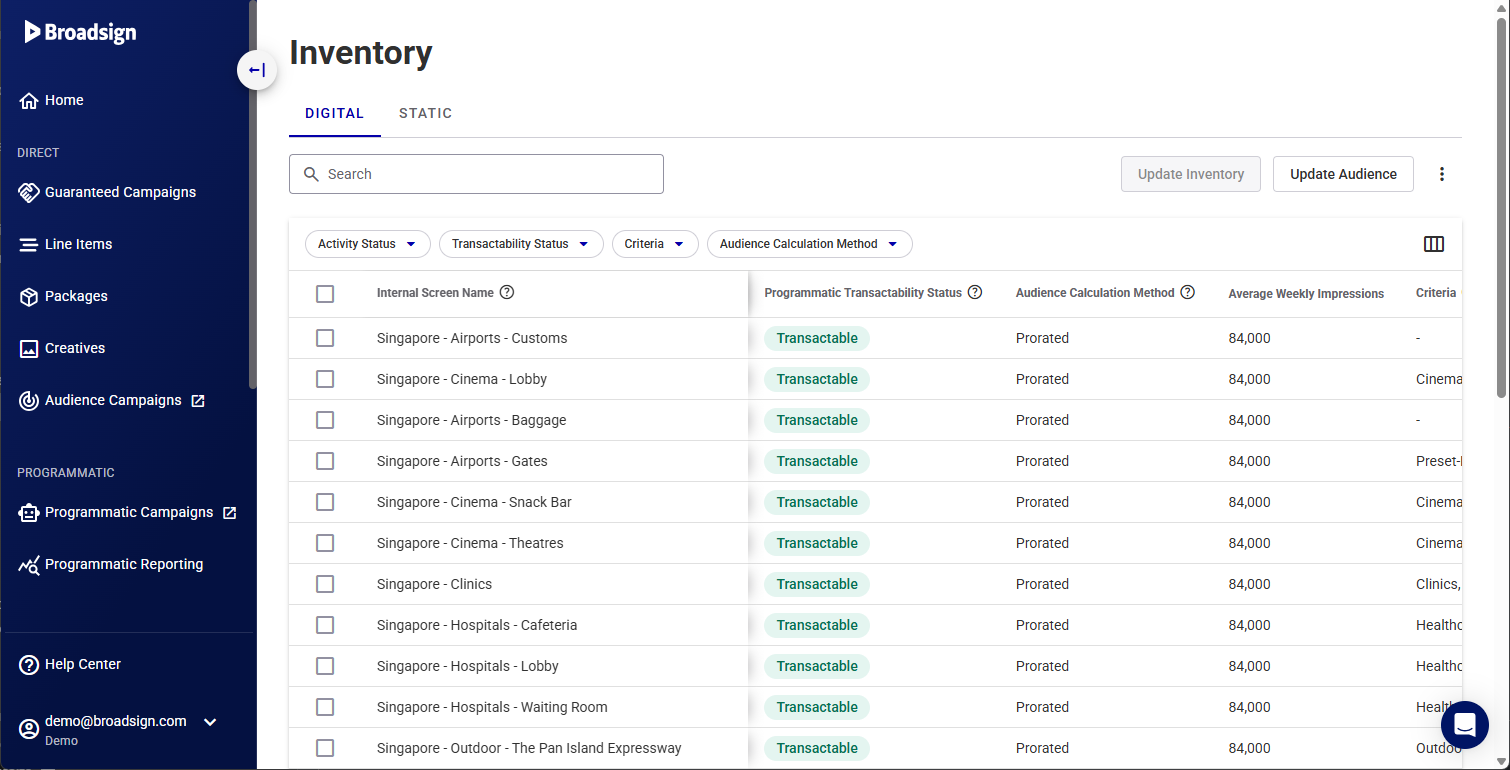
The following are all the columns available in the list. You can customize the columns displayed and their order by using the  button.
Some columns are available only for Broadsign inventory, while other columns are available only for Third-Party Players inventory. For more information, see Broadsign Digital Screen Inventory vs. Third-Party Players.
| Column | Description |
|---|---|
| Shared Columns (Broadsign inventory and Third-Party Players inventory) | |
| Activity Status |
The status of each screen, whether it's Active or Inactive. Active screens are in operation and can be booked on. |
| Address |
Address of the screen taken from the Display Unit. This parameter cannot be edited in the Broadsign Platform. Changes must be done in our Content and Network Management solution. Example: 21 Greens Road RD 2 Ruawai 0592 |
| Allowed Ad Types |
Ad types supported by the Broadsign Platform. If more than one type is supported, use a ";" to separate them.
Example: static;video;html |
| Audience Calculation Method |
Audience Calculation Method used by the screen.
Each ad within a loop gets the same number of delivered impressions.
The audience per hour should be prorated proportionally to the actual slot length. In other words, a prorated formula takes into account variable slot lengths and their impact on impressions calculation. Note: The Audience Calculation method is set in our Content and Network Management solution at the Loop Policy level. For more information, see Loop Policy Variables in the Content and Network Management documentation. |
| Audience Data Sources |
Name of the audience data source, separated by ";". See Audience Sources for supported sources. Example: ACI;Blimp |
| Average Impression Multiplier |
Average impression multiplier for the screen, as in the average amount of viewable impressions per ad slot. |
| Average Weekly Impressions |
Estimated average weekly total impressions. It must be a value higher than 0. This value is calculated automatically by using the next four weeks worth of data to calculate how many impressions are delivered on a weekly (7 days) basis. It cannot be calculated when:
This value is used by DSPs to plan their campaigns. Example: 1000 |
| Bearing |
Facing direction of the screen or face, in degrees. Select between N, NE, E, SE, S, SW, W, and NW. Example: NE |
| Buyer Facing Name |
A short and descriptive name of the screen or face (location, specialty, etc.). It must be unique. Example: Times Square Screen |
| Diagonal Size |
Diagonal size of the screen in the measurement unit defined in Diagonal Size Unit. It must be a value higher than 0. Example: 20 |
| DMA Code |
Designated Market Area (Nielsen measurement). Applicable only to US networks. Example: 501 |
| Floor CPM (AUD) |
Screen CPM floor in Australian dollars. This is an information field where the publisher should add an average CPM for the screen. Actual pricing will be set at the deal ID level. Example: 10 |
| Floor CPM (CAD) |
Screen CPM floor in Canadian dollars. This is an information field where the publisher should add an average CPM for the screen. Actual pricing will be set at the deal ID level. Example: 10 |
| Floor CPM (EUR) |
Screen CPM floor in Euros. This is an information field where the publisher should add an average CPM for the screen. Actual pricing will be set at the deal ID level. Example: 10 |
| Floor CPM (GBP) |
Screen CPM floor in British pounds. This is an information field where the publisher should add an average CPM for the screen. Actual pricing will be set at the deal ID level. Example: 10 |
| Floor CPM (NZD) |
Screen CPM floor in New Zealand dollars. This is an information field where the publisher should add an average CPM for the screen. Actual pricing will be set at the deal ID level. Example: 10 |
| Floor CPM (USD) |
Screen CPM floor in US dollars. This is an information field where the publisher should add an average CPM for the screen. Actual pricing will be set at the deal ID level. Example: 10 |
| Hivestack ID | Screen Identifier in Hivestack. |
| Internal Screen Name |
Name of the screen autogenerated based on the Display unit name and Frame name. See Screen Naming (Broadsign Inventory). This parameter cannot be edited in the Broadsign Platform. Changes must be done in our Content and Network Management solution. |
| Lat/Long |
Geographical coordinates in decimal degrees. This parameter cannot be edited in the Broadsign Platform. Changes must be done in our Content and Network Management solution. |
| Max Ad Duration (ms) |
Maximum ad slot length in milliseconds. It must not be lower than the Min Ad Duration value. Example: 30000 |
| Min Ad Duration (ms) |
Minimum ad slot length in milliseconds. It must be a value higher than 0. Example: 10000 |
| Motion Allowed |
Whether or not motion type content is allowed to play on this screen. |
| Open Exchange Enabled |
Whether this screen is transactable on our Programmatic Campaigns solution's Open Exchange. If enabled, floor prices are taken directly from the screen object, screens will be visible to integrated DSPs and transactable without a Deal ID. |
| Programmatic Device ID (Reach Device ID) |
The original Reach Device ID available in the Programmatic Campaigns module before migrating to the Broadsign Platform. |
| Programmatic Transactability Status |
The status of each screen, whether it's Transactable programmatically or Not Transactable. If a screen displays a Not Transactable status, you can hover your cursor over this status to discover the specific information you must update to enable transactability. The system automatically propagates any screens that support programmatic transactions directly to our Programmatic Campaigns solution. For more information, see Digital vs. Static Inventory and Edit the Screen Activity Status. |
| Reference ID |
External reference ID available to the customer to identify the screen. This ID will be used to match the screen and update it if it already exists. The field is limited to 255 characters. |
| Resolution |
The number of lines (horizontal and vertical) of pixels on a screen. This parameter cannot be edited in the Broadsign Platform. Changes must be done in our Content and Network Management solution. Example: 1024x768 |
| Screen Image Count |
The number of image URLs provided for this screen. Image URLs are defined in the Screen Image URLs parameter, which is available when performing one of the following actions:
|
| Screen Type |
Type of the screen used. The screen type is used to assist with Broadsign’s sustainability efforts. Accepted values are:
Example: 101 |
| Time Zone |
Geographic region within which the same standard time is used. This parameter cannot be edited in the Broadsign Platform. Changes must be done in our Content and Network Management solution. |
| Venue Type |
Venue type ID. See options in Venue Types. Example: 80701 |
| Vistar ID | Screen Identifier in Vistar. |
| Broadsign inventory-specific columns | |
| Audience Type |
General descriptor for the type of audience being used:
Note: This parameter is available for Broadsign inventory. For more information, see Broadsign Digital Screen Inventory vs. Third-Party Players. |
| Criteria |
List of Criteria associated with the screen. Each screen inherits the Criteria associated with its Display Unit and its frame(s) in our Content and Network Management solution. For screen groups, the screens inherit the Criteria associated with the Display Units that make up the group. For more information on Criteria, see Criteria and Conditions in the Content and Network Management documentation. Note: This parameter is available for Broadsign inventory. For more information, see Broadsign Digital Screen Inventory vs. Third-Party Players. |
| Display Unit ID |
The ID of the corresponding display unit screen in our Content and Network Management solution. This information is optional. This parameter cannot be edited in the Broadsign Platform. Changes must be done in our Content and Network Management solution. Note: This parameter is available for Broadsign inventory. For more information, see Broadsign Digital Screen Inventory vs. Third-Party Players. |
| Third-Party Players inventory-specific columns | |
| Allow Deal Creation by Broadsign |
Indicates whether Broadsign can create programmatic deals that include this screen without prior authorization. Note: This parameter is available for Third-Party Players inventory. For more information, see Broadsign Digital Screen Inventory vs. Third-Party Players. |
| Asset Type |
Type of asset for the screen. It is automatically set to Digital. Note: This parameter is available for Third-Party Players inventory. For more information, see Broadsign Digital Screen Inventory vs. Third-Party Players. |
| Attributes |
List of Third-Party Players Attributes associated with the screen. Note: This parameter is available for Third-Party Players inventory. For more information, see Broadsign Digital Screen Inventory vs. Third-Party Players. |
| Auction Type |
Auction type for the screen:
For more information, see Understanding Deals on Place Exchange. Note: This parameter is available for Third-Party Players inventory. For more information, see Broadsign Digital Screen Inventory vs. Third-Party Players. |
| Broadsign Availability Share % |
The percentage share of the loop duration for a given screen. Note: This parameter is available for Third-Party Players inventory. For more information, see Broadsign Digital Screen Inventory vs. Third-Party Players. |
| External IDs |
External identifiers associated with the screen. The field uses the following structure:
Note: This parameter is available for Third-Party Players inventory. For more information, see Broadsign Digital Screen Inventory vs. Third-Party Players. |
| Impressions (4 Weeks) |
Total impression count over a four-week period. Note: This parameter is available for Third-Party Players inventory. For more information, see Broadsign Digital Screen Inventory vs. Third-Party Players. |
| Private Auction Only |
Whether the screen is limited to private auction only. Note: This parameter is available for Third-Party Players inventory. For more information, see Broadsign Digital Screen Inventory vs. Third-Party Players. |
| Screen Inactivity Schedules |
List of schedules that determine when the screen is inactive. Each schedule must be separated by the "|" character. The field uses the following structure:
Note: This parameter is available for Third-Party Players inventory. For more information, see Broadsign Digital Screen Inventory vs. Third-Party Players. |
| Slot Duration (ms) |
Default ad slot length in milliseconds. It must be a value higher than 0. This is mandatory. Example: 10000 Note: This parameter is available for Third-Party Players inventory. For more information, see Broadsign Digital Screen Inventory vs. Third-Party Players. |
| Unified Inventory ID |
ID used to represent the panel in the unified inventory. Note: This parameter is available for Third-Party Players inventory. For more information, see Broadsign Digital Screen Inventory vs. Third-Party Players. |
| Unit Count |
Number of units for the screen. Note: This parameter is available for Third-Party Players inventory. For more information, see Broadsign Digital Screen Inventory vs. Third-Party Players. |
| Venue Name |
Name or description of the venue. This is mandatory. Note: This parameter is available for Third-Party Players inventory. For more information, see Broadsign Digital Screen Inventory vs. Third-Party Players. |
| Venue Reference ID |
An external reference ID provide by the customer to identify the venue. If no ID is provided, it will be automatically generated. Note: This parameter is available for Third-Party Players inventory. For more information, see Broadsign Digital Screen Inventory vs. Third-Party Players. |
Clicking the Static tab displays all the static faces available in your inventory.
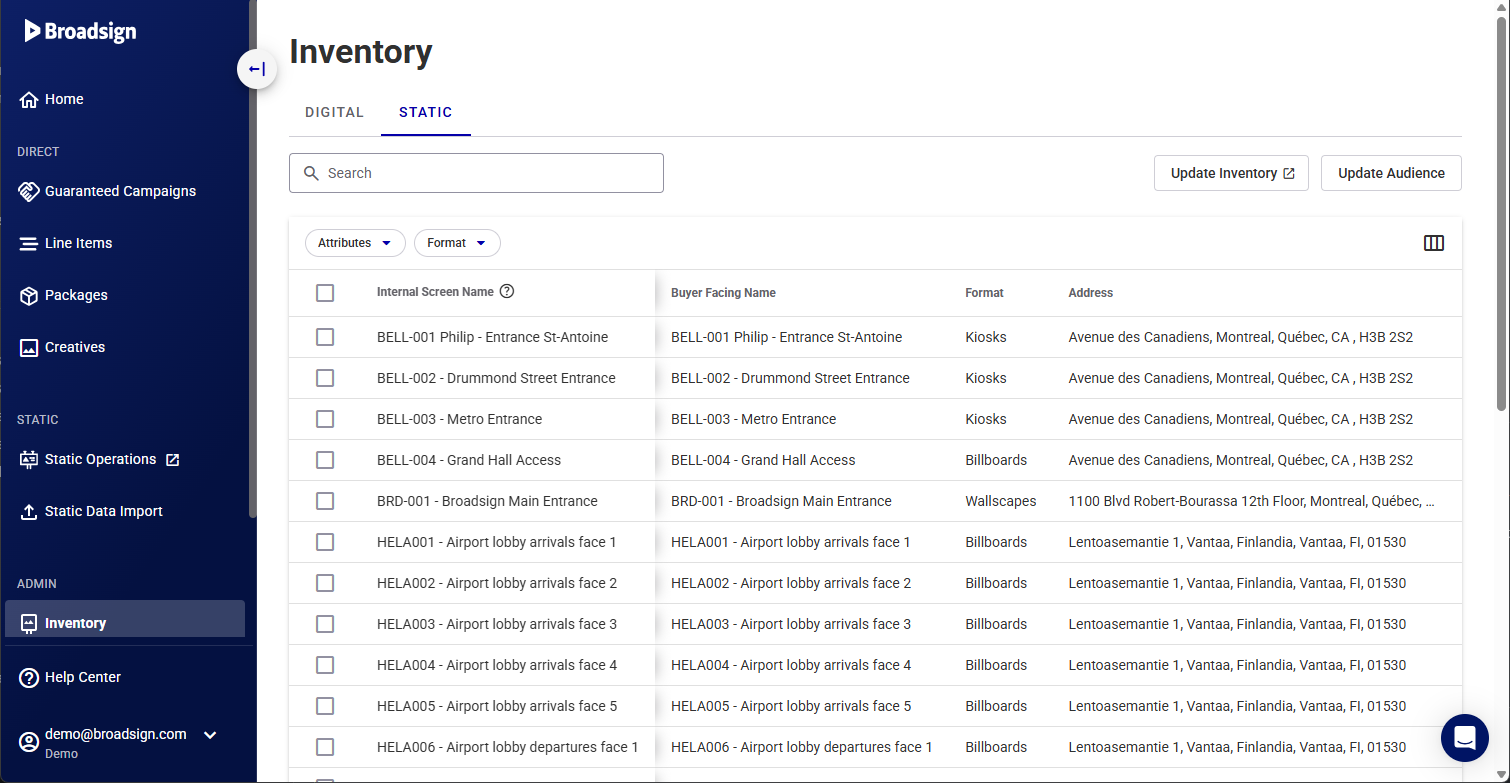
The following are all the columns available in the list. You can customize the columns displayed and their order by using the button.
| Column | Description |
|---|---|
| Address |
Address of the face. This parameter cannot be edited in the Broadsign Platform. Changes must be done in the Static Operations module. Example: 21 Greens Road RD 2 Ruawai 0592 |
| Attributes |
List of Inventory Attributes associated with the face. Proper setup of these Inventory Attributes is essential for the Campaigns to function as intended. Incorrectly configured Inventory Attributes can lead to Campaigns targeting the wrong Faces or failing to target the right Faces. For more information, see Inventory Attributes. |
| Average Weekly Impressions |
Estimated average weekly total impressions. It must be a value higher than 0. This value is calculated automatically by using the next four weeks worth of data to calculate how many impressions are delivered on a weekly (7 days) basis. It cannot be calculated when:
This value is used by DSPs to plan their campaigns. Example: 1000 |
| Bearing |
Facing direction of the screen or face, in degrees. Select between N, NE, E, SE, S, SW, W, and NW. Example: NE |
| Face Size |
Size of the face. This parameter cannot be edited in the Broadsign Platform. Changes must be done in the Static Operations module. Example: Extra Wide |
| Format |
Format of the face (for example, billboard, poster, scroller). This parameter cannot be edited in the Broadsign Platform. Changes must be done in the Static Operations module. Example: billboard |
| Internal Screen Name |
Autogenerated name of the face. This parameter cannot be edited in the Broadsign Platform. Changes must be done in the Static Operations module. |
| Lat/Long |
Geographical coordinates in decimal degrees. This parameter cannot be edited in the Broadsign Platform. Changes must be done in the Static Operations module. |
| Screen Image Count |
The number of image URLs provided for this screen. Image URLs are defined in the Screen Image URLs parameter, which is available when performing one of the following actions:
|
| Venue Type |
Venue type ID. See options in Venue Types. Example: 80701 |


