 minutes de lecture
The panel on the left of the Line Item page contains two sets of information:
- The Ad Settings information
- The Filters that you can apply to narrow down your screen inventory (see The Filters Panel (Obsolete)).
You can toggle between the two.

The Ad Settings panel allows you to specify the ad length and flight (date and time range). You can also specify the type of buy and the saturation (that is, loops per play or plays per loop). With these settings, the system calculates the availability and fill rate of the screens in your narrowed list.

Set the ad duration to calculate the screen availability. Valid range: 1-3600 seconds.

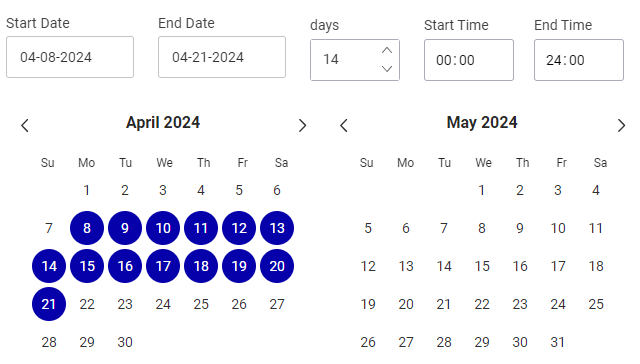
Set the date range to calculate the screen availability. Click the dates to open the calendar dialogue box.

| Section | Description |
|---|---|
|
Enter or select the start and end date of the date range that you want to use to calculate screen availability. |

|
Set the duration of your selected ad flight, in days. |

|
Select the daily start and end time for which you want to calculate screen availability. The default value is “00:00 – 23:59”, that is, 24 hours a day. |

|
Select the days of the week for which you want to calculate screen availability. |

|
To cancel the settings you have entered, click Cancel. To save your changes and apply them to the screen inventory, click Done. |
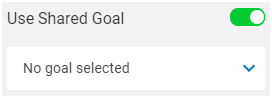
Associate the line item with an existing shared goal. Voir Utiliser les objectifs partagés.
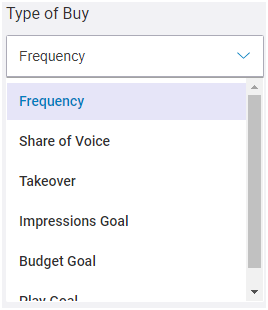
Select the type of buy.
- Frequency – The number of times that an ad will play during the ad flight. Used in conjunction with the Saturation. Pour plus d'informations, consulter Type d'achat Fréquence.
- Share of Voice (SoV) – The Share of Voice (SoV) is a type of ad revenue model that focuses on the percentage of activities for one specific brand. If an advertiser wants to increase the chances of their content to be seen, they can increase their SoV. When selecting Share of Voice (SoV), a second drop-down menu offers you a choice of SoV types:
- Fixed – Modèle de revenus publicitaires SoV qui garantit une SoV fixe en tout temps. Il offre la possibilité de s'engager sur une part de voix spécifique à chaque boucle, si disponible. C'est le type de part de voix le plus rigide car il n'implique aucune répartition.
- Daily Average – Modèle de revenus publicitaires SoV qui garantit que les campagnes contractées maintiennent la part de voix spécifiée chaque jour de la durée de diffusion, quels que soient les écrans où la part de voix est allouée. Vous pouvez ainsi vendre une SoV qui sera répartie aussi uniformément que possible sur tous les écrans tout en respectant la moyenne souhaitée.
- Daily Average per screen – Modèle de revenus publicitaires SoV qui permet la réservation d'une SoV moyenne pour atteindre une SoV quotidienne spécifique sur chaque écran, quelles que soient les heures de diffusion de la publicité. Vous pouvez ainsi vendre une SoV quotidienne sur chaque écran qui sera répartie aussi uniformément que possible sur toutes les heures de la journée.
- Campaign Average – Modèle de revenus publicitaires SoV qui garantit que la part de voix demandée est atteinte en moyenne sur toute la durée de la campagne.
- Takeover – Used for campaigns that take over a set of screens for a specific point in time. Pour plus d'informations, consulter Type d'achat par prise de contrôle (Takeover).
- Impressions Goal – The total number of times that people are likely to notice an ad. Pour plus d'informations, consulter Objectif d'impressions.
- Budget Goal – The amount that you are prepared to pay for the ad flight. Pour plus d'informations, consulter Objectif de budget.
-
Play Goal – The total number of times that an ad will play. Pour plus d'informations, consulter Type d'achat avec objectif de diffusions.
Pour plus d'informations, consulter Types d'achat par part de voix (SoV).
Your Administrator may have defined which types of buy you can use. In that case, some of the types of buy listed above may not be available for you. For more information, see Colonne Rebalancing in the Platform Settings.
Your Administrator may have set a maximum saturation value, which prevents you from having a saturation that is too high. The maximum saturation value applies to the Impressions Goal, Budget Goal, and Play Goal types of buy. For more information, see Section Digital Inventory in the Platform Settings.

Set the saturation, that is, the number of ad plays per loop or number of loops per play. For example, you can set an ad to play twice per loop or once every two loops.

As an option enabled by your admin in the Platform Settings, the SoV Limit value can be used with the Impressions Goal type of buy to set the maximum percentage of the loop that can be assigned to the line item. Pour plus d'informations, consulter Limite de SoV.
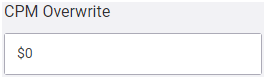
Apply your own CPM value to your screen selection.
You can also compute pricing information based on third-party integration. In this case, Guaranteed Campaigns receives a CPM override to your line item. Voir Utiliser l'API de tarification externe.
Note : The CPM will only be updated if you modify anything on the line item.
You can set the URL of your external pricing API endpoint in the Domain settings. Voir Pricing API.

Apply the Ad Settings parameters to the selected screens.


