
Improved
APIv3
- Added a replace and a remove operation to Face Attributes APIs.
Splash
-
Splash / Scheduling / Campaigns
- Added a Contracted Time read-only field to show the real contracted time of the campaign.

Fixed
Juice
- Juice / Sales / Static Avails
- Fixed an issue that prevented modified Inventory Attributes from updating properly.
Alto
- Fixed the Units map view.
Splash Player / Cloud Extender
- Fixed an issue that prevented large FTP folders to be synchronized properly on the Players and Cloud Extenders.
Digital Campaign Performance Dashboard
- Removed Expected Plays from campaigns finalized after their scheduled start dates.
Improved
Splash Player
- Aspect Ratio content filtering for campaign and fillers is now customizable instead of the default 10%.
- Added a new setting for Players and Cloud Extenders to persist their logging parameters. See Basic Info Tab (Player) and Configure the Cloud Extender.
By default, the aspect ratio is 10%, but it can be adjusted to be more permissive or restrictive, as needed. Contact Broadsign Services if you want to change the aspect ratio value.

APIv3
- Added a new API to link and unlink faces to face packs.
- Campaign attributes can now be added for Cancelled campaigns. This was already possible in the UI.
Fixed
Splash Player
- Fixed an issue preventing the player on Windows to close consistently when using the
Ctrl+Shift+Skey combination.
Improved
Juice
- Juice / Sales / Static Avails and Static Pack Avails
- In Timeline view, the Hide Proposals options allows you to see what is really committed.
- Improved performance when searching with filters applied.

- Splash / Assets / Zones
- Audience values from zones are now inherited from the parent face’s audience card.
Splash Player
- Added a default 20 minutes timer when setting the player in windowed mode.
API
- Added an endpoint to set Campaign Attributes.
Fixed
- Fixed an issue where an incorrect campaign context was used in the Scheduling Groups.
Improved
Splash
- Splash / Scheduling / Campaigns
- When creating a new Digital Booking Line in the System Administration Connector, you can now define a default Loop Template and Saturation level for each Media Group. See Adding a Booking Line.
- Scheduling Groups now display the full campaign duration while automatically filtering statistics to show only present and future scheduled hours. You can also display only unscheduled hours. See Access Scheduling Groups.


- Splash / Assets / Zones
- Audience values from zones are now inherited from the parent face’s audience card.
APIv3
- Added the ability to link and unlink Faces from Face Packs.
Fixed
Alto
- Fixed an issue where the content schedule would wrongly show that it cannot schedule a bundle because it has a video.
- Fixed Unit list ordering.
- Fixed an issue where some content would not appear properly.
Splash
- Splash / Assets
- Fixed an issue where the inventory attributes would not show properly when searching for faces.
- Fixed an issue where Site or Face attributes would fail to refresh when navigating between assets in the Asset tab.
Improved
Splash Player
- The fullscreen or windowed player mode on Windows can now be triggered via the player’s internal API. See Splash Player.
Fixed
Splash Player
- Fixed an issue where the Windows task bar would randomly show on some players.
Splash
-
Splash / Scheduling / Campaigns
- Fixed an issue that would lead to an incorrect calculation of booked hours in the Scheduling Group Summary page.
- Improved performance when loading the Scheduling Group Summary page data.
- Fixed an issue leading to a “Object Reference not set to an instance of an object” error when adjusting booking dates.
API
- Improved performance when retiring a Face in a Face Pack.
Fixed
Juice
- Juice / Sales / Static Avails
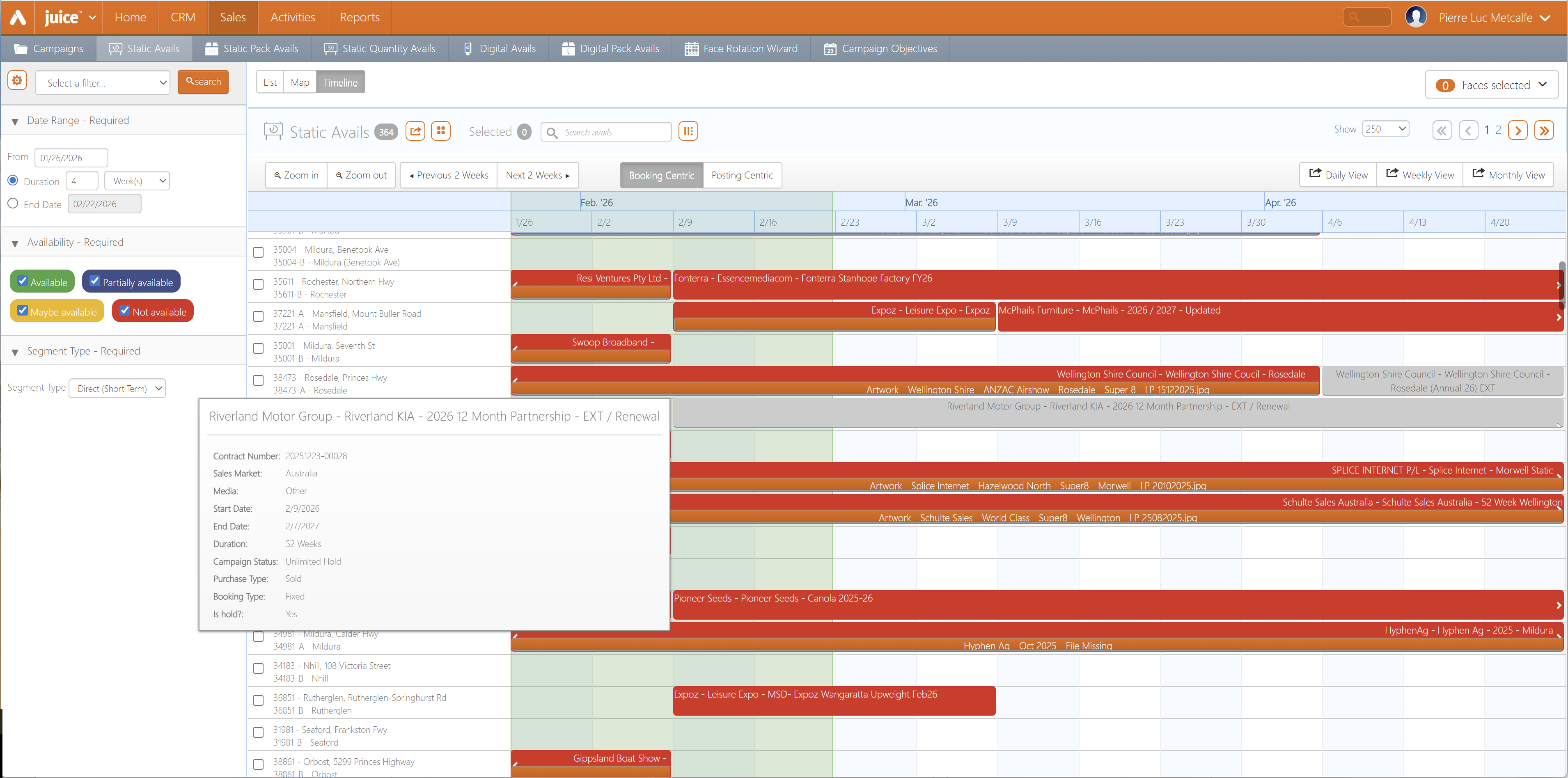
- Fixed an issue preventing Unlimited Hold bookings to be marked in gray.
API
- Fixed an issue preventing the Find Campaigns API to fetch data from the last page.
- Fixed an issue that caused the Digital Face Sync Groups and Saleability by ID API endpoints to return duplicate data.
Splash Player
- Fixed an issue preventing Emergency Messages using HTML files only to start.