 minute read
Publishers can seamlessly enable Open Auction in their Inventory through the Place Exchange portal.
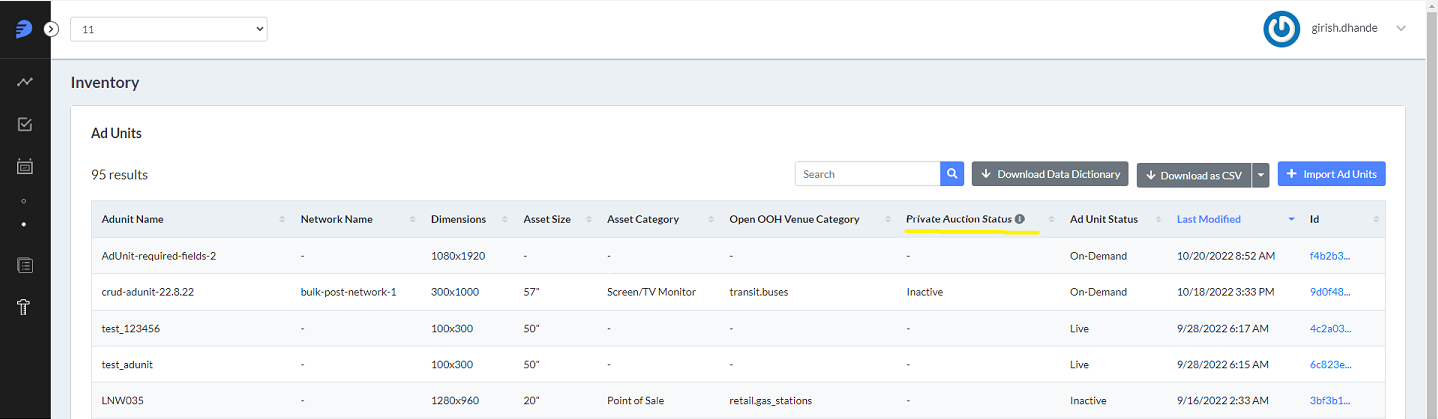
To update your inventory to activate Ad Units for Open Auction:
Place Exchange
- When accessing the Portal, select the Production org in the top left drop-down.
- Select Ad Units under the Inventory menu on the left.
- In this view, review the current setting in the Open Auction Status column.
- Click on Download CSV to get an export of all the Ad Units currently registered in the platform.
- Find the
private_auctioncolumn in the export. - If
private_auctionis currently set to "1", you must update the Ad Units that are eligible for Open Auction to "0". - 0 = all bids are accepted
- 1 = bids are restricted to the deals specified
- Find the
auction.bidfloorandauction.alt_bidfloors.videocolumns to ensure the correct bid floors are represented in your inventory. - Once
private_auctionandbidfloorsare updated, save the updated file. - Import the file using the Import Ad Units button.
- Return to the Ad Units page and check to see that the Open Auction Status is now marked as "Active".
The following are the two accepted values for private_auction:
Once the import is complete, you will receive a summary and confirmation of the updated inventory.
If the Publisher is currently sending in the private_auction, auction.bidfloor, and/or auction.alt_bidfloors.video in the ad request, the ad requests will also need to be updated to reflect these new values. To enable Open Auction at the network level, contact help@placeexchange.com.
