 minute read
This document guides users through resolving errors when uploading location data. It details specific location data errors, explains their causes, and provides the steps to resolve them.
Description
If you enter latitude and longitude coordinates for an ad unit and the system displays the following error message:
"Error resolving location data. Try again later"
Reason
The system cannot retrieve the location data because the host server is offline.
Solution
Retry to fetch the data after 10-15 minutes.
Description
If you enter latitude and longitude coordinates for an ad unit and the system displays the following error message:
"Unable to fetch location data. Try again with more accurate lat and lon values"
Reason
There are two reasons that cause this error:
- The geocode service, which auto-populates location data, timed out while retrieving the information.
- The system cannot find location data for the specific coordinates you entered. This typically happens when the coordinates are invalid or point to an unmapped area, such as a body of water.
Scenario 1:
- latitude : 10.54934
- longitude: -43.054
If we locate these coordinates on Google Map:

On the portal, you can see the following error:

Solution
- On the portal, re-upload the csv or Excel file with valid coordinates.
- If the issue persists, review and adjust the latitude and longitude coordinates to obtain a successful response containing all location attributes. You can verify that the coordinates are valid and do not point to a body of water by searching for them in Google Maps.
- If the issue persists, contact help@placeexchange.com.
Description
You encounter the following error while uploading location data in adunit creation:
“Please provide correct lat, long. DMA does not exist for these lat long”
Reason
- This error occurs when uploading USA data only, as DMA values only belongs to USA.
- The provided coordinates are on the edge of a body of water (on the shore), so the location data cannot provide DMA values from the service.
First scenario:
- Latitude: 40.64538
- Longitude: -74.1085
- Location on Google Maps

The provided coordinates are in a body of water, so DMA values are not present in location data.
Second scenario:
- Latitude: 46.526
- Longitude: -87.387
- If we locate these co-ordinates on Google Maps, we get the following location:

On the portal, you will see the following error:

Solution
- Adjust the latitude and longitude values to ensure the service returns correct DMA location data. Verify these new coordinates to confirm they point to valid landmasses rather than a body of water or a coastline.
- You must modify the longitude values for coordinates located in certain countries. Add a hyphen, or negative sign, directly in front of the longitude value to format these specific coordinates correctly.
- If the issue persists, contact help@placeexchange.com.
Description
The DMA or DMA Code becomes blank (specifically for Unmeasured Alaska).
Reason
- This can occur when uploading USA data for Unmeasured Alaska.
- The provided coordinates fall within a region of Alaska that Nielsen designates as "Unmeasured Alaska." As a result, this specific geographic area lacks DMA codes.
- https://thevab.com/storage/app/media/Toolkit/DMA_Map_2019.pdf
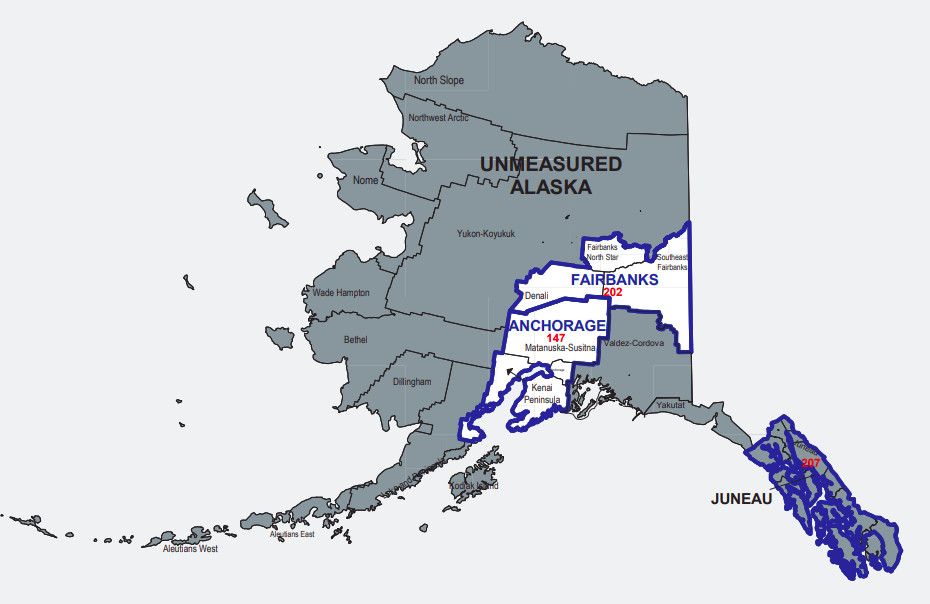
Example:
- Latitude: 59.63859
- Longitude: -151.51
- DMA: abc
- DMA code: 504
- Location on Google Maps:
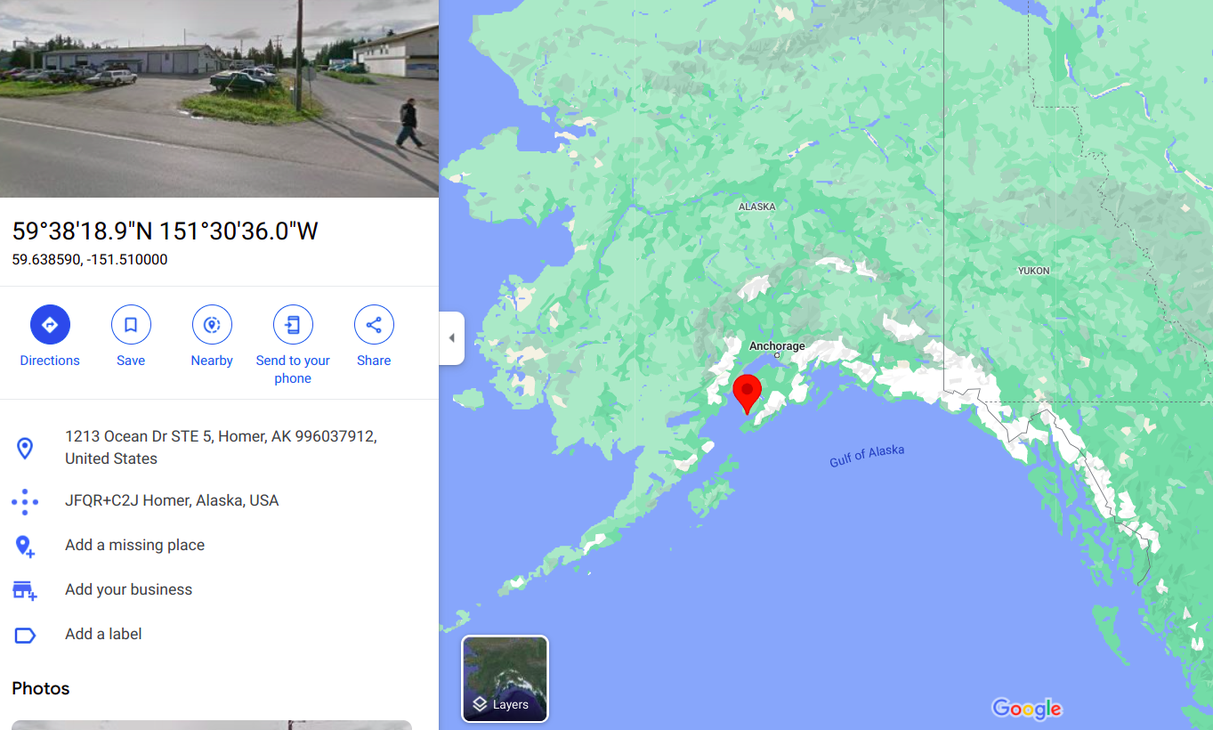
On the portal, you see the following messages:

Solution
If you think that the DMA or DMA code should not be blank, then try to change the latitude and longitude values so that there will be correct DMA values present in the location data.
Description
You encounter the following error while uploading location data in adunit creation:
“Please provide correct lat, long. Zip does not exist for these lat long”
Reason
- This error occurs when uploading Canada inventory data.
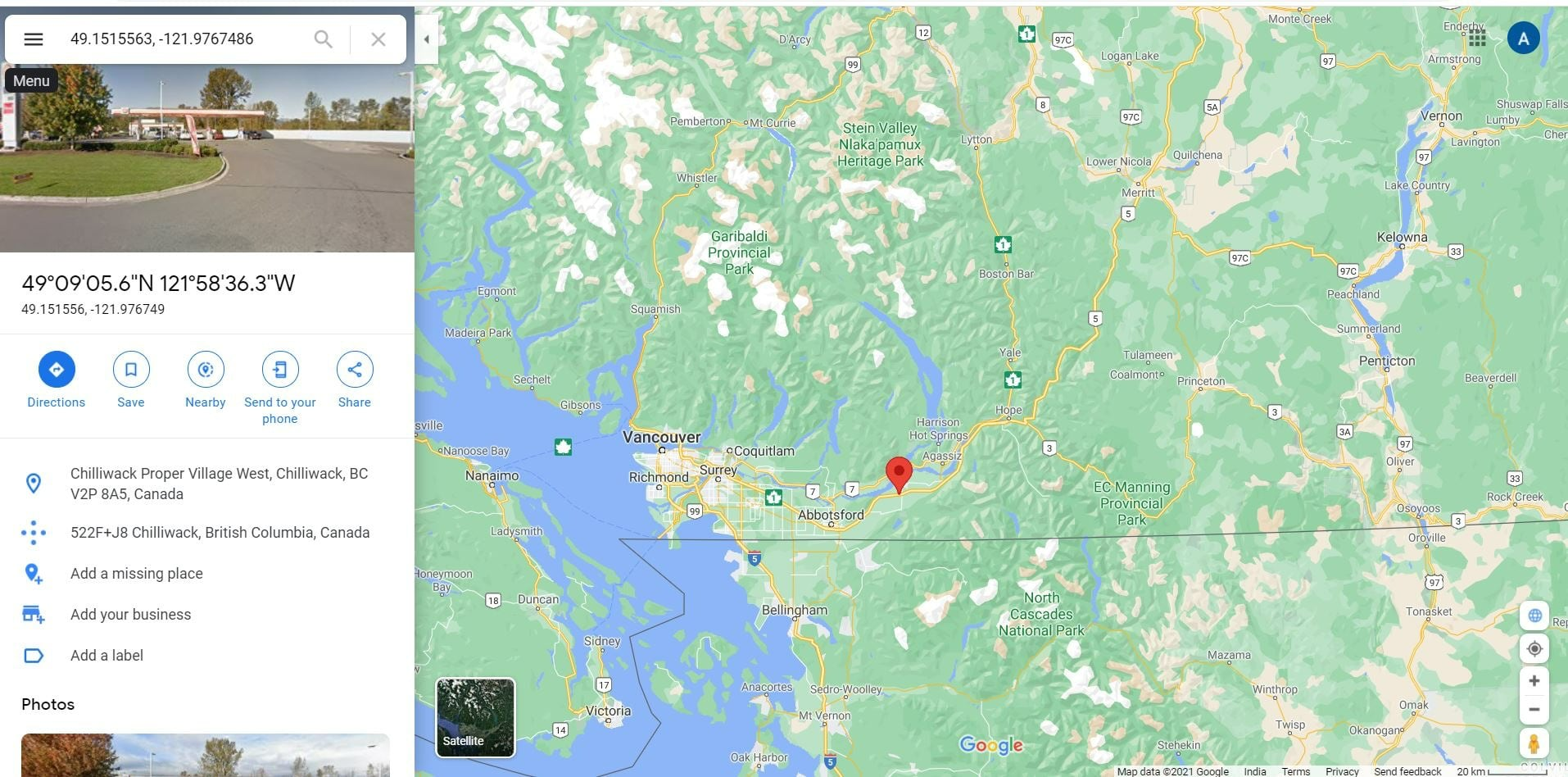
- If the entered coordinates fall on the border between the United States and Canada, the system may misattribute them. Even if you enter coordinates intended for Canada, the location data service might return attributes belonging to the United States.
- Additionally, the location data service does not return ZIP code attributes for certain coordinates located within Canada.
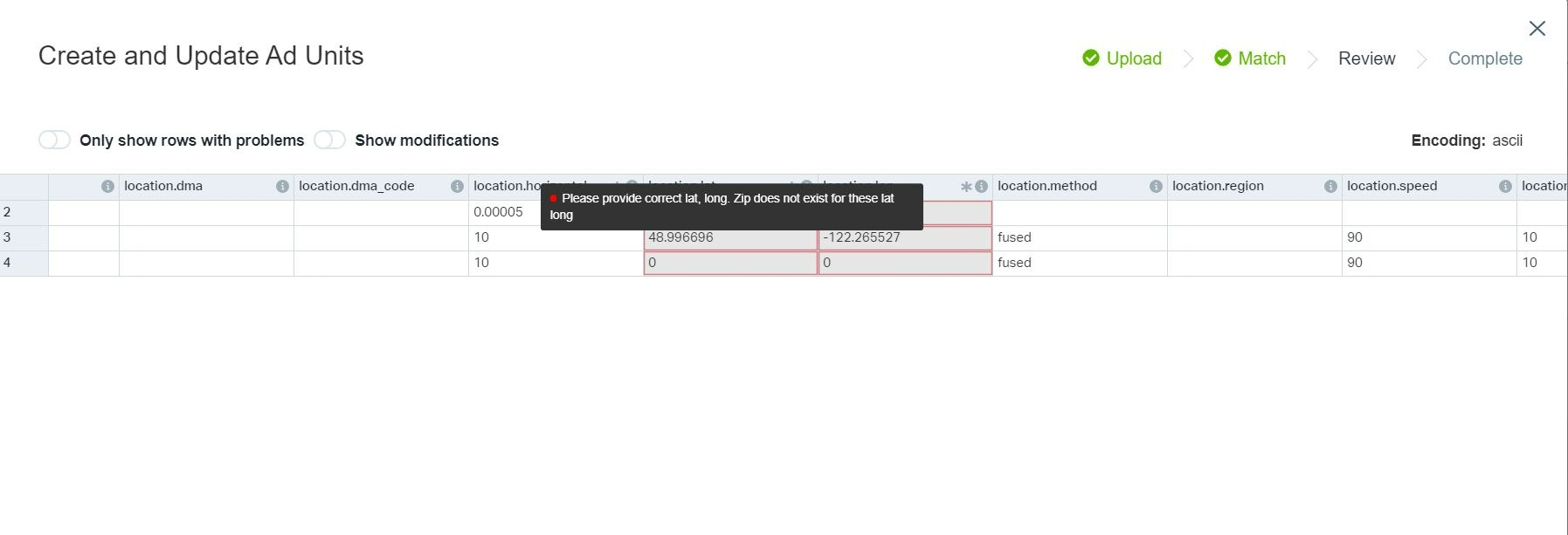
Scenario example:
- Latitude: 49.1515563
- Longitude: -121.9767486
- Location on Google Maps
Solution
- Adjust the latitude and longitude values to move the location away from the border between the United States and Canada. This adjustment ensures the location data service returns a valid ZIP code for those coordinates.
- If the issue persists, contact help@placeexchange.com.
Description
You encounter the following error while uploading location data in adunit creation:
"Country VIR not supported. Check lat and lon if this is unexpected."
Reason
- The system currently supports location data for the following countries: the United States (USA), Canada (CAN), Singapore (SGP), Indonesia (IDN), Mexico (MEX), Peru (PER), Brazil (BRA), Chile (CHL), and Argentina (ARG). The system triggers an error if you enter coordinates that belong to any unsupported country.
- Additionally, the system generates an error if you upload incorrectly formatted coordinates, such as omitting the required hyphen or negative sign from a longitude value.
- Finally, the system may trigger an error for coordinates located on a small island territory of the United States if the location data service misidentifies the territory as a separate sovereign country.
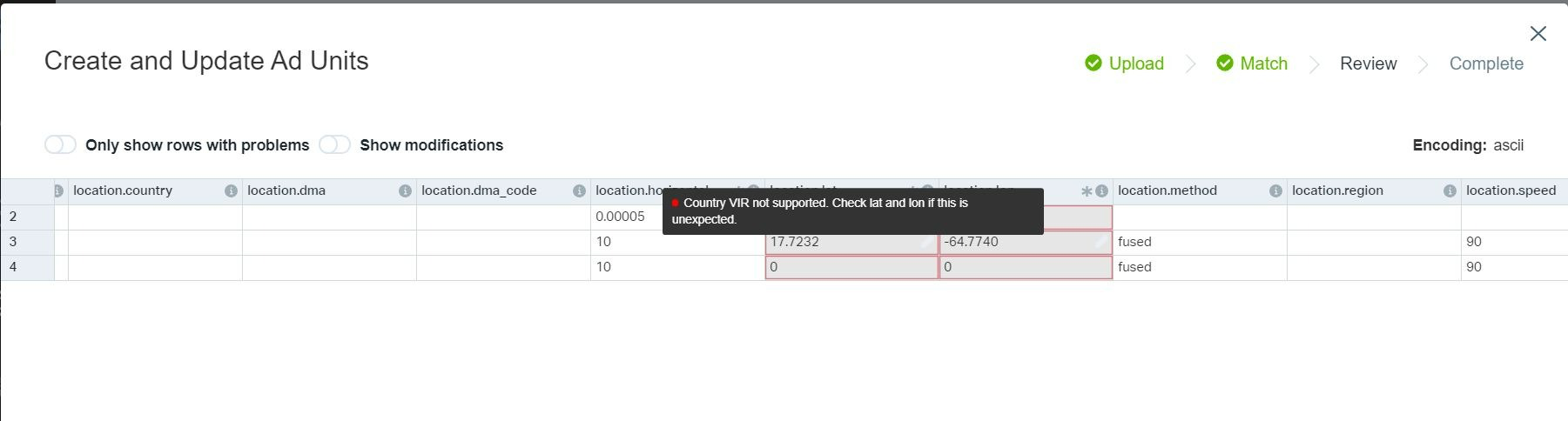
Scenario:
- Latitude: 17.7232
- Longitude: -64.7740
- Location on Google Maps

Solution
- Pay close attention to latitude and longitude values when uploading data. Frequently, users omit the required negative sign (hyphen) in front of the longitude value. This omission causes the system to map the coordinates to an entirely different country.
- Additionally, avoid using coordinates that point to small islands. The location data service rarely returns accurate results for these specific geographic areas.
- If the issue persists, contact help@placeexchange.com.
Description
You encountes the following error while uploading location data in adunit creation:
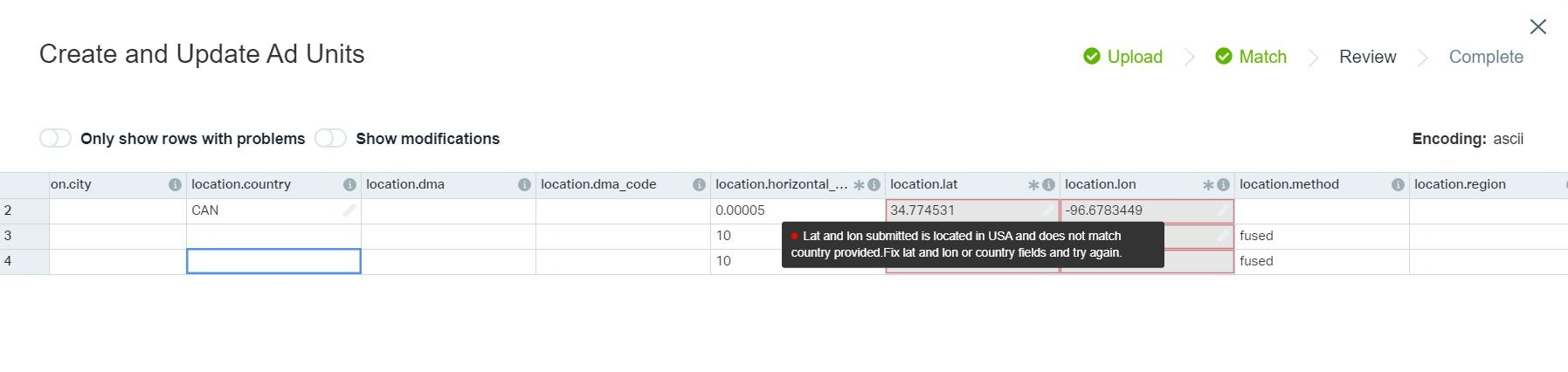
"Lat and lon submitted is located in USA and does not match country provided. Fix lat and lon or country fields and try again."
Reason
The user provided a country that does not match with the country attribute value in location data from the service.
The following screenshot shows a user entering coordinates for the United States while selecting Canada (CAN) in the country field. The system triggers an error because this user-provided country value contradicts the service location data associated with those coordinates.
Solution
Enter the country as the value shown in the message.
Description
If you provide latitude and longitude coordinates for United States island territories but only populate either the DMA or the DMA code field, the system triggers a validation error. Depending on which field you leave blank, the system displays one of the following messages: "DMA code must be set when DMA is set" or "DMA must be set when DMA code is set."
Reason
- The Geocode service does not return a DMA and DMA code for ad units located near or within United States island territories. Users must manually enter these values for those specific locations.
- To prevent confusion and planning issues caused by incomplete data, the system now enforces a validation rule that requires users to populate both the
dmaanddma_codefields together.
Solution
Either provide both dma and dma_code, or leave both blank.