 minute read
When Publishers submit incorrect metadata for their inventory, whether through improper registration or invalid ad request overrides, Place Exchange Support identifies these errors. To prevent downstream complications while working with Publishers to resolve the data issues, Place Exchange Support changes the AdUnit's status to In-Review.
The system automatically rejects any ad requests originating from In-Review AdUnits. The corresponding ad request response includes an error detailing the AdUnit's current status. After the Publisher corrects the metadata errors, Place Exchange Support updates the AdUnit status to resume normal operations.
Misrepresentation of inventory metadata impacts buyer targeting and activation, sales planning, and can potentially be a violation of the Place Exchange Clear guidelines.
Place Exchange supports audits auction data to detect inconsistencies by primarily comparing if:
- The Publisher specified value on the adrequest is different than what is registered on the adunit.
- The Publisher changed the value during a particular time period.
The following are some of the issues that may lead to the inventory getting flagged:
- Inconsistent Venue Names
- Inconsistent Venue Addresses
- Inconsistent Location Lat/Lon
- Inconsistent Location Region/Country
- Inconsistent Measurement Imp X
- Measurement Imp X is greater than or equal to 500 or Imp X = 0
- Inconsistent Slot Sizes
- Inconsistent Slot Durations
- Inconsistent Asset Capabilities and Mimes
- Incompatible Asset Capabilities and Mimes
Place Exchange Support details the reasons for flagging specific inventory in its communication to the Publisher.
Place Exchange Support uses the In-Review status to notify users if incorrect metadata is registered as described in Inventory Metadata Issues.
Once an adunit has the In-Review status, all the adrequests originating through those adunits are rejected until Place Exchange Support updates the status.
Set or Reset the Adunit Status to "In-Review"
The ability to set or reset the In-Review status on an adunit is restricted to Place Exchange support.
Updating the status from In-Review to any other status (such as Pending or Live) or from any other status to In-Review is not permitted.
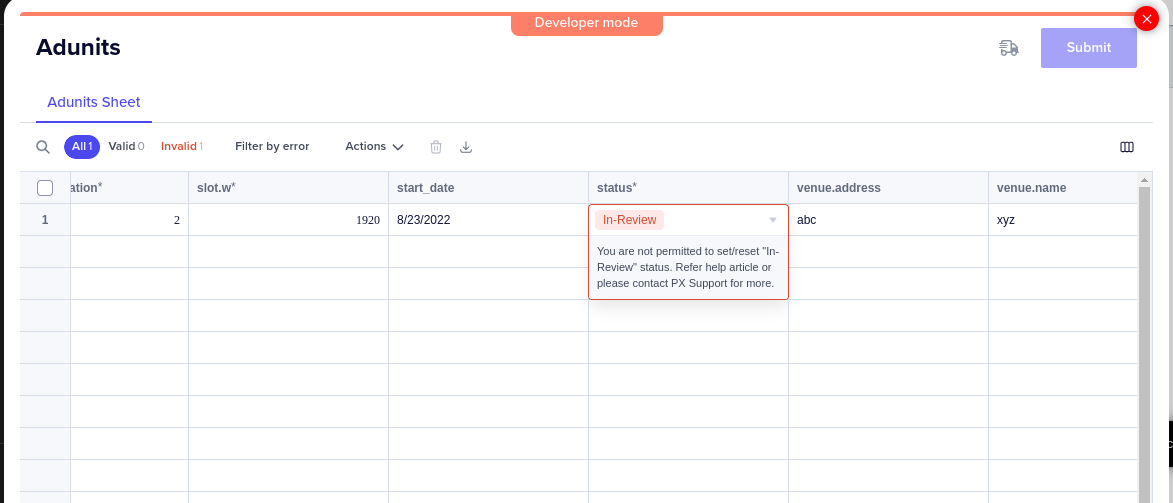
Publishers can continue to update other adunit attributes such as venue, location, measurement to fix the inconsistencies, while the status is kept In-Review.
Filter Inventory by Status in the Portal
Publishers can filter inventory by status in the Portal to view only the In-Review inventory. For more details, see Managing Inventory in the Portal.

Download Filtered Results in he Portal
When the In-Review inventory status filter is applied, Publishers can download a CSV or Excel file containing only the affected inventory. Publishers can then use this filtered file to correct the inconsistent metadata and upload the revised version through the Portal. For more details, see Managing Inventory in the Portal.
Observe Error Rate for Adunits Getting Rejected in Portal Reporting
Requests originating from In-Review adunits will get rejected with an error. Publishers can check the Inventory Health Breakout report for Count of adunits by Status along with the Error Rate and Health rate by (selected Group By) in the Portal. For more details, see Reporting for Publishers.
For more information, contact help@placeexchange.com or your Partnership Manager.
