 minute read
While specific steps vary based on the use case or campaign type, activating a PMP campaign always involves the same core activities.
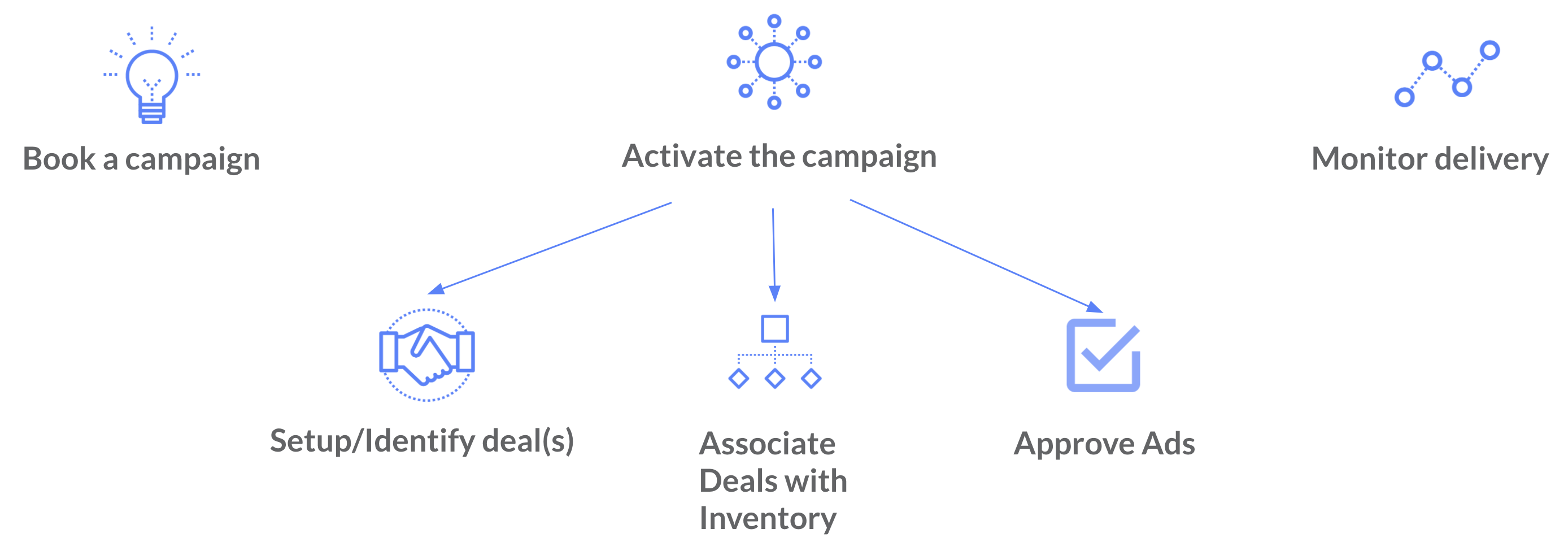
This step concludes the sales process after the buyer negotiates pricing and terms with the Publisher and books a campaign. For deals originated by the Place Exchange Sales team, the team communicates these details via an order form.
Indirect deals follow a separate workflow. The buyer contacts the Publisher directly, and the Publisher books the campaign in their own system without any Place Exchange involvement.
This step includes the setup and configuration required for the campaign to launch. Buyers have their own steps to go through to activate the campaign, which are not covered here. The following steps are specific to the Publisher.
Regardless of specific terms, activating a PMP campaign requires you to set up a deal prior to launch. If you configure deals manually in the Portal, refer to Deal Management. If the campaign uses existing always-on deals, you can skip the setup process entirely. See the Campaign Scenarios for specific setup variations.
This is a critical step in the activation process where the inventory that a campaign targets can be associated with the deals used to bid on the campaign. This can happen either in the media owner's ad server or in Place Exchange using placements. See Placements if you are setting up the placements yourself.
Note: Buyers will not receive bid requests until you complete this step, regardless of how you associate deals with inventory.
Creatives the buyer bids on for a specific campaign appear as pending ads in the Portal. The campaign will not deliver until you approve the corresponding ads. For instructions on the approval process, refer to Approving Creatives in the Publisher Portal.
After you activate the campaign, you must monitor daily delivery to confirm you configured the setup correctly. You can use the Revenue by Day report to verify proper functionality. If you set up the deal and associated it with inventory correctly, you can validate ad requests and bid activity using the Deal Monitoring report. If the campaign fails to deliver, consult the Campaign Troubleshooting report to identify lost bids. For comprehensive details regarding these tools and supported use cases, refer to Reporting for Publishers.
Now that the activities in the workflow have been listed, let's look at variations in the steps driven by how the campaign is activated.
Always-on deals enable buyers to activate campaigns quickly by skipping the coordination that needs to happen when activating through custom deals. To ensure this is effective, always-on deals usually target all inventory or entire networks. This allows the buyer to apply targeting criteria relevant to each campaign while accessing availability across the entire network.
When the campaign is activated on an existing Always-on deal, usually the only relevant step in the process is Approving Ads. That is, the buyer will not book a Campaign, and deal setup and trafficking is skipped since the always-on deal already exists and the trafficking has been completed.
Occasionally, the inventory targeted by the Always-on deal might change - if this happens, the placements associated with the Always-on deal will have to be amended to have the updated set of inventory.
There might be cases where a campaign cannot be activated by layering targeting criteria on to existing always-on deals. This usually happens for one or more of the reasons listed below:
- No always-on deals exist with this agency.
- Deal terms (pricing, auction type, guaranteed) for this campaign is different from existing always-on deals.
- Inventory targeted for this campaign is not included in what is targeted by existing always-on deals.
When any of the above scenarios are true, a custom deal will have to be setup. When the campaign is activated using a custom deal specific to this campaign, all steps listed above are still necessary for the activation process. If the trafficking is done in Place Exchange, there are a couple of things to consider:
- Campaign targeting an existing placement – This implies that there are one or more placements already available that target the same set of inventory as this new campaign. In that case, the new PMP deal just needs to be added the right placements.
- Campaign targeting a new placement – If the campaign is using targeting criteria that requires a brand new grouping of inventory, a new placement that has the right adunits or networks will have to be created and this new PMP deal will have to be associated with this placement.
